> ## Documentation Index
> Fetch the complete documentation index at: https://cometchat-22654f5b-docs-agent-in-group-react-v6.mintlify.site/llms.txt
> Use this file to discover all available pages before exploring further.
# New Attachment Option
> New Attachment Option — CometChat integration guide.
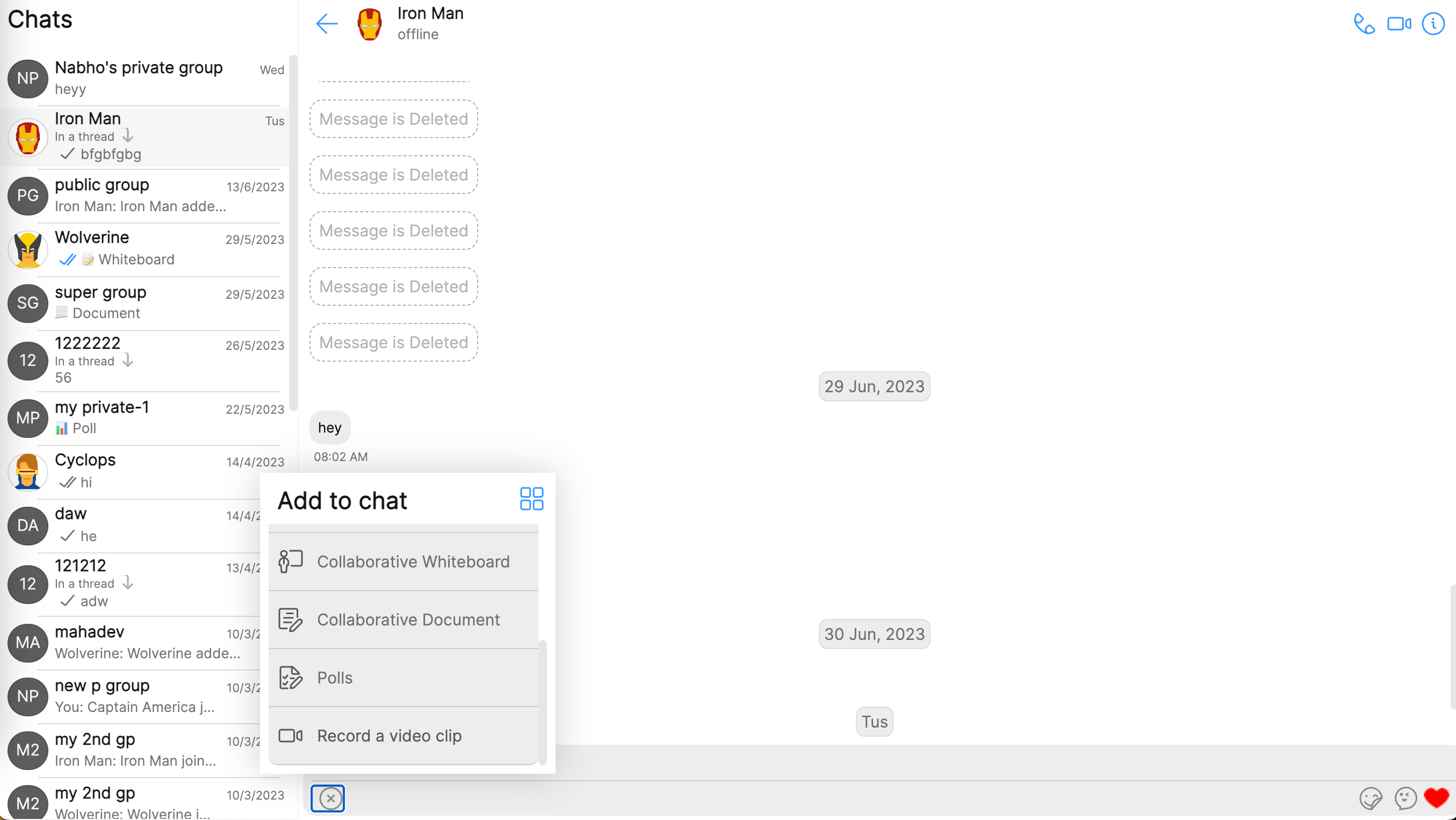
In this guide, we will demonstrate how to add a custom option to the action sheet of the [MessageComposer](/ui-kit/angular/message-composer) component. This guide is meant to showcase how custom features can be built on top of the existing codebase, enabling developers to tailor the user experience to their specific requirements.
We recommend that you read the [Key Concepts](/fundamentals/key-concepts) , follow the guidelines, and also take the time to familiarise yourself with the library's [components](/ui-kit/angular/components-overview).
In the example below, we are going to simulate a video recorder when user clicks on the custom option.
## Custom Option
The first step is to create the custom option that will be populated on the action sheet of the message composer. `CometChatMessageComposerAction` is part of the `resources` package and is of the following structure.
```ts theme={null}
export class CometChatMessageComposerAction {
id: string;
iconURL: string;
title?: string;
iconTint?: string;
titleFont?: string;
titleColor?: string;
background?: string;
borderRadius?: string;
onClick: (() => void) | null = null;
}
```
## Click handler
We'll launch a video recorder component when user clicks on the custom option.
```ts theme={null}
startCamera(): void {
navigator.mediaDevices.getUserMedia({ video: true })
.then((stream: MediaStream) => {
this.mediaStream = stream;
this.videoElement.nativeElement.srcObject = stream;
this.videoElement.nativeElement.play();
})
.catch((error: any) => {
console.error('Error accessing camera:', error);
});
}
clickHandler = () => {
// do something custom
this.startCamera();
}
const videoRecordOption = new CometChatMessageComposerAction({
id: "videoRecord",
title: "Record a video clip",
iconURL: "./assets/video.svg",
onClick: clickHandler
})
```
The video record option is then pushed to the default set of attachment options supported by the Angular UI Kit. The default options are fetched using the `CometChatUIKit` class.
```ts theme={null}
let options: CometChatMessageComposerAction[] =
CometChatUIKit.getDataSource().getAttachmentOptions(
undefined,
item instanceof CometChat.User ? item : undefined,
item instanceof CometChat.Group ? item : undefined,
ComposerId
);
options.push(videoRecordOption);
```
The attachment options are then passed to the [ConversationsWithMessages](/ui-kit/angular/conversations-with-messages) component as a prop using [MessageComposerConfguration](/web-shared/message-composer-configuration).
```ts theme={null}
this.messagesConfiguration.messageComposerConfiguration.attachmentOptions = (
item: CometChat.User | CometChat.Group,
ComposerId: ComposerId
) => options;
```
## Implementation
With the completion of each individual piece, we can now integrate all the code snippets to form the final code example.
### Code
```html theme={null}
{{ recordingTime | date: 'mm:ss' : 'UTC' }}
```
```ts theme={null}
import { Component, ElementRef, OnInit, ViewChild } from "@angular/core";
import { CometChat } from "@cometchat/chat-sdk-javascript";
import {
CometChatMessageComposerAction,
CometChatUIKitConstants,
fontHelper,
} from "@cometchat/uikit-resources";
import {
MessagesConfiguration,
ComposerId,
CometChatUIKitUtility,
} from "@cometchat/uikit-shared";
import {
CometChatUIKit,
CometChatThemeService,
} from "@cometchat/chat-uikit-angular";
import "@cometchat/uikit-elements";
@Component({
selector: "app-attachment-options",
templateUrl: "./attachment-options.component.html",
styleUrls: ["./attachment-options.component.scss"],
})
export class AttachmentOptionsComponent implements OnInit {
//create the required variable.
@ViewChild("videoElement") videoElement!: ElementRef;
@ViewChild("previewElement") previewElement!: ElementRef;
mediaStream!: MediaStream;
public messagesConfiguration: MessagesConfiguration =
new MessagesConfiguration({});
public isRecording = false;
public recordingTime = 0;
public recordingTimer: any;
public mediaRecorder!: MediaRecorder;
public recordedChunks: Blob[] = [];
public showPreview: boolean = false;
public videoBlob!: Blob | null;
public user!: CometChat.User;
public group!: CometChat.Group;
public showScreen: boolean = false;
//destroy the time interval
ngOnDestroy(): void {
clearInterval(this.recordingTimer);
}
//accessing global theme object.
constructor(private themeService: CometChatThemeService) {}
//get the existing attachment options and add a new option on init.
ngOnInit() {
this.messagesConfiguration.messageComposerConfiguration.attachmentOptions =
(item: CometChat.User | CometChat.Group, ComposerId: ComposerId) => {
let options: CometChatMessageComposerAction[] =
CometChatUIKit.getDataSource().getAttachmentOptions(
undefined,
item instanceof CometChat.User ? item : undefined,
item instanceof CometChat.Group ? item : undefined,
ComposerId
);
options.push(
new CometChatMessageComposerAction({
title: "Record a video clip",
id: "videoRecord",
iconURL: "./assets/video.svg",
iconTint: this.themeService.theme.palette.getAccent700(),
titleFont: fontHelper(this.themeService.theme.typography.subtitle1),
titleColor: this.themeService.theme.palette.getAccent700(),
borderRadius: "8px",
background: this.themeService.theme.palette.getAccent100(),
onClick: () => {
this.startCamera(item); //this will be called once user clicks on the option.
},
})
);
return options;
};
}
//start the camera on attachment option click
startCamera(item: CometChat.User | CometChat.Group): void {
//storing the user and group object
if (item instanceof CometChat.User) {
this.user = item;
} else {
this.group = item;
}
this.showScreen = true;
navigator.mediaDevices
.getUserMedia({ video: true })
.then((stream: MediaStream) => {
this.mediaStream = stream;
this.videoElement.nativeElement.srcObject = stream;
this.videoElement.nativeElement.play();
})
.catch((error: any) => {
console.error("Error accessing camera:", error);
});
}
//close the camera.
stopCamera(): void {
this.stopRecording();
this.mediaRecorder?.stop();
this.mediaRecorder?.stream.getTracks().forEach((track) => {
track.stop();
});
clearInterval(this.recordingTimer);
this.videoBlob = null;
if (this.mediaStream) {
this.showScreen = false;
this.showPreview = false;
const tracks = this.mediaStream.getTracks();
tracks.forEach((track) => {
track.stop();
});
}
}
//start the recording
startRecording(): void {
this.showPreview = false;
navigator.mediaDevices
.getUserMedia({ video: true })
.then((stream: MediaStream) => {
this.videoElement.nativeElement.srcObject = stream;
this.videoElement.nativeElement.play();
this.recordedChunks = [];
this.mediaRecorder = new MediaRecorder(stream);
this.mediaRecorder.ondataavailable = (event: BlobEvent) => {
if (event.data.size > 0) {
this.recordedChunks.push(event.data);
}
};
this.mediaRecorder.start();
this.isRecording = true;
this.recordingTime = 0;
this.recordingTimer = setInterval(() => {
this.recordingTime += 1000;
}, 1000);
})
.catch((error: any) => {
console.error("Error accessing webcam:", error);
});
}
//stop the recording
stopRecording(): void {
this.showPreview = true;
if (this.isRecording) {
this.mediaRecorder.stop();
this.mediaRecorder.onstop = () => {
clearInterval(this.recordingTimer);
this.isRecording = false;
const videoBlob = new Blob(this.recordedChunks, { type: "video/webm" });
const videoUrl = URL.createObjectURL(videoBlob);
this.videoBlob = videoBlob;
this.previewElement.nativeElement.src = videoUrl;
};
}
}
//toggle start recording/stop recording button
toggleRecording(): void {
if (this.showPreview) {
this.sendRecording();
} else {
if (this.isRecording) {
this.stopRecording();
} else {
this.startRecording();
}
}
}
//send recording as a media message and close the preview.
sendRecording() {
this.showPreview = false;
const uploadedFile = this.videoBlob;
const reader = new FileReader();
reader.addEventListener(
"load",
() => {
const newFile = new File(
[reader.result as ArrayBuffer],
"recorded-video",
{ type: uploadedFile!.type }
);
let { receiverId, receiverType } = this.getReceiverDetails();
let mediaMessage: CometChat.MediaMessage = new CometChat.MediaMessage(
receiverId,
newFile,
CometChatUIKitConstants.MessageTypes.video,
receiverType
);
mediaMessage.setType(CometChatUIKitConstants.MessageTypes.video);
mediaMessage.setMetadata({
["file"]: newFile,
});
mediaMessage.setSentAt(CometChatUIKitUtility.getUnixTimestamp());
mediaMessage.setMuid(CometChatUIKitUtility.ID());
CometChatUIKit.sendMediaMessage(mediaMessage);
this.stopRecording();
this.stopCamera();
},
false
);
reader.readAsArrayBuffer(uploadedFile!);
}
//get receiver details
getReceiverDetails() {
let receiverId!: string;
let receiverType!: string;
if (this.user && this.user.getUid()) {
receiverId = this.user.getUid();
receiverType = CometChatUIKitConstants.MessageReceiverType.user;
} else if (this.group && this.group.getGuid()) {
receiverId = this.group.getGuid();
receiverType = CometChatUIKitConstants.MessageReceiverType.group;
}
return { receiverId: receiverId, receiverType: receiverType };
}
}
```
```css theme={null}
.screenRecorder {
position: absolute;
top: 0;
z-index: 100;
display: flex;
align-items: center;
justify-content: center;
flex-direction: column;
background-color: rgba(0, 0, 0, 0.7);
height: 100%;
width: 100%;
}
.recording-icon {
height: 24px;
width: 24px;
display: block;
background-color: red;
border-radius: 50%;
}
.buttons {
display: flex;
flex-direction: row;
justify-content: flex-start;
}
.timer {
color: white;
display: flex;
align-items: flex-start;
justify-content: center;
}
.recording-icon-wrapper {
height: 24px;
width: 24px;
margin-right: 8px;
}
video {
height: 300px;
width: 400px;
}
.video-container {
display: flex;
flex-direction: column;
align-items: flex-end;
}
button {
height: fit-content;
width: fit-content;
}
```
```html theme={null}
```
### Result