> ## Documentation Index
> Fetch the complete documentation index at: https://cometchat-22654f5b-docs-agent-in-group-react-v6.mintlify.site/llms.txt
> Use this file to discover all available pages before exploring further.
# Threaded Messages Header
> Displays the parent message bubble and reply count for a threaded conversation.
`CometChatThreadHeader` renders the parent message bubble and reply count for a threaded conversation. It requires a parent message to display.
 ***
## Where It Fits
`CometChatThreadHeader` is a header component for threaded message views. Wire it above a `CometChatMessageList` and `CometChatMessageComposer` to build a complete threaded conversation layout.
```xml activity_thread.xml lines theme={null}
```
```kotlin lines theme={null}
val threadHeader = findViewById(R.id.thread_header)
threadHeader.setParentMessage(parentMessage)
```
```kotlin lines theme={null}
CometChatThreadHeader(
parentMessage = parentMessage
)
```
***
## Quick Start
Add to your layout XML:
```xml lines theme={null}
```
Set the parent message — this is required:
```kotlin lines theme={null}
override fun onCreate(savedInstanceState: Bundle?) {
super.onCreate(savedInstanceState)
setContentView(R.layout.activity_thread)
val threadHeader = findViewById(R.id.thread_header)
threadHeader.setParentMessage(baseMessage)
}
```
```kotlin lines theme={null}
@Composable
fun ThreadScreen() {
CometChatThreadHeader(
parentMessage = baseMessage
)
}
```
Prerequisites: CometChat SDK initialized with `CometChatUIKit.init()`, a user logged in, and the UI Kit dependency added.
***
## Actions and Events
### Callback Methods
`CometChatThreadHeader` is a display-only header. It does not expose component-specific callbacks like `setOnItemClick` or `setOnError`.
### SDK Events (Real-Time, Automatic)
The component listens to SDK events internally via its ViewModel. No manual setup needed.
| SDK Listener | Internal behavior |
| ------------------- | --------------------------------- |
| Message edited | Updates the parent message bubble |
| Message deleted | Updates the parent message bubble |
| Reply count changed | Updates the reply count indicator |
***
## Functionality
| Method (Kotlin XML) | Compose Parameter | Description |
| ------------------------------------ | ------------------------- | --------------------------------- |
| `setParentMessage(message)` | `parentMessage = message` | Set the parent message (required) |
| `setUser(user)` | `user = user` | Set the user context |
| `setGroup(group)` | `group = group` | Set the group context |
| `setReactionVisibility(View.GONE)` | `hideReactions = true` | Toggle reactions on parent bubble |
| `setAvatarVisibility(View.GONE)` | `hideAvatar = true` | Toggle avatar visibility |
| `setReceiptsVisibility(View.GONE)` | `hideReceipts = true` | Toggle read receipts |
| `setReplyCountVisibility(View.GONE)` | `hideReplyCount = true` | Toggle reply count text |
***
## Style
Define a custom style in `themes.xml`:
```xml themes.xml lines theme={null}
```
```kotlin lines theme={null}
threadHeader.setStyle(R.style.CustomThreadHeaderStyle)
```
```kotlin lines theme={null}
CometChatThreadHeader(
parentMessage = baseMessage,
style = CometChatThreadHeaderStyle.default().copy(
backgroundColor = Color(0xFFFEEDE1),
replyCountTextColor = Color(0xFFF76808),
replyCountBackgroundColor = Color(0xFFFEEDE1)
)
)
```
***
## Where It Fits
`CometChatThreadHeader` is a header component for threaded message views. Wire it above a `CometChatMessageList` and `CometChatMessageComposer` to build a complete threaded conversation layout.
```xml activity_thread.xml lines theme={null}
```
```kotlin lines theme={null}
val threadHeader = findViewById(R.id.thread_header)
threadHeader.setParentMessage(parentMessage)
```
```kotlin lines theme={null}
CometChatThreadHeader(
parentMessage = parentMessage
)
```
***
## Quick Start
Add to your layout XML:
```xml lines theme={null}
```
Set the parent message — this is required:
```kotlin lines theme={null}
override fun onCreate(savedInstanceState: Bundle?) {
super.onCreate(savedInstanceState)
setContentView(R.layout.activity_thread)
val threadHeader = findViewById(R.id.thread_header)
threadHeader.setParentMessage(baseMessage)
}
```
```kotlin lines theme={null}
@Composable
fun ThreadScreen() {
CometChatThreadHeader(
parentMessage = baseMessage
)
}
```
Prerequisites: CometChat SDK initialized with `CometChatUIKit.init()`, a user logged in, and the UI Kit dependency added.
***
## Actions and Events
### Callback Methods
`CometChatThreadHeader` is a display-only header. It does not expose component-specific callbacks like `setOnItemClick` or `setOnError`.
### SDK Events (Real-Time, Automatic)
The component listens to SDK events internally via its ViewModel. No manual setup needed.
| SDK Listener | Internal behavior |
| ------------------- | --------------------------------- |
| Message edited | Updates the parent message bubble |
| Message deleted | Updates the parent message bubble |
| Reply count changed | Updates the reply count indicator |
***
## Functionality
| Method (Kotlin XML) | Compose Parameter | Description |
| ------------------------------------ | ------------------------- | --------------------------------- |
| `setParentMessage(message)` | `parentMessage = message` | Set the parent message (required) |
| `setUser(user)` | `user = user` | Set the user context |
| `setGroup(group)` | `group = group` | Set the group context |
| `setReactionVisibility(View.GONE)` | `hideReactions = true` | Toggle reactions on parent bubble |
| `setAvatarVisibility(View.GONE)` | `hideAvatar = true` | Toggle avatar visibility |
| `setReceiptsVisibility(View.GONE)` | `hideReceipts = true` | Toggle read receipts |
| `setReplyCountVisibility(View.GONE)` | `hideReplyCount = true` | Toggle reply count text |
***
## Style
Define a custom style in `themes.xml`:
```xml themes.xml lines theme={null}
```
```kotlin lines theme={null}
threadHeader.setStyle(R.style.CustomThreadHeaderStyle)
```
```kotlin lines theme={null}
CometChatThreadHeader(
parentMessage = baseMessage,
style = CometChatThreadHeaderStyle.default().copy(
backgroundColor = Color(0xFFFEEDE1),
replyCountTextColor = Color(0xFFF76808),
replyCountBackgroundColor = Color(0xFFFEEDE1)
)
)
```
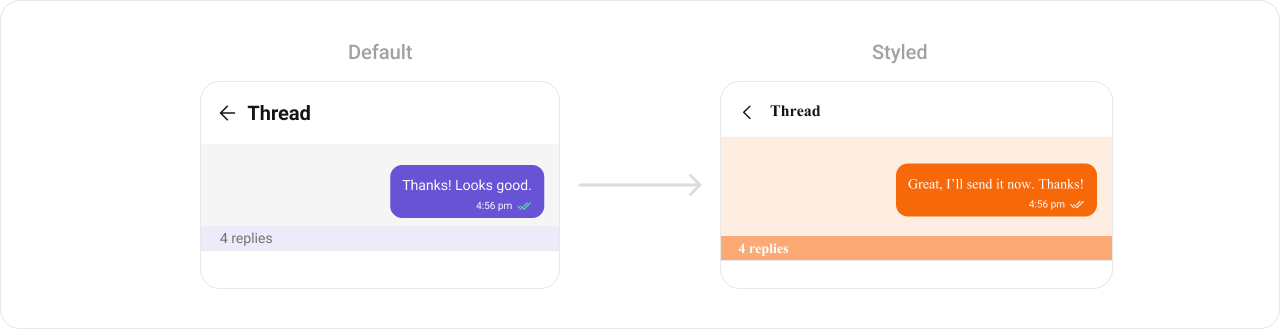 See [Component Styling](/ui-kit/android/v6/component-styling) for the full reference.
***
## ViewModel
```kotlin lines theme={null}
val viewModel = ViewModelProvider(this)
.get(CometChatThreadHeaderViewModel::class.java)
```
```kotlin lines theme={null}
threadHeader.setViewModel(viewModel)
```
```kotlin lines theme={null}
CometChatThreadHeader(
parentMessage = baseMessage,
threadHeaderViewModel = viewModel
)
```
See [ViewModel & Data](/ui-kit/android/v6/customization-viewmodel-data) for state observation and custom repositories.
***
## Next Steps
Display messages in a conversation
Display user/group info in the toolbar
Rich input for sending messages
Browse recent conversations
See [Component Styling](/ui-kit/android/v6/component-styling) for the full reference.
***
## ViewModel
```kotlin lines theme={null}
val viewModel = ViewModelProvider(this)
.get(CometChatThreadHeaderViewModel::class.java)
```
```kotlin lines theme={null}
threadHeader.setViewModel(viewModel)
```
```kotlin lines theme={null}
CometChatThreadHeader(
parentMessage = baseMessage,
threadHeaderViewModel = viewModel
)
```
See [ViewModel & Data](/ui-kit/android/v6/customization-viewmodel-data) for state observation and custom repositories.
***
## Next Steps
Display messages in a conversation
Display user/group info in the toolbar
Rich input for sending messages
Browse recent conversations