> ## Documentation Index
> Fetch the complete documentation index at: https://cometchat-22654f5b-docs-agent-in-group-react-v6.mintlify.site/llms.txt
> Use this file to discover all available pages before exploring further.
# Conversations
> Scrollable list of recent one-on-one and group conversations for the logged-in user.
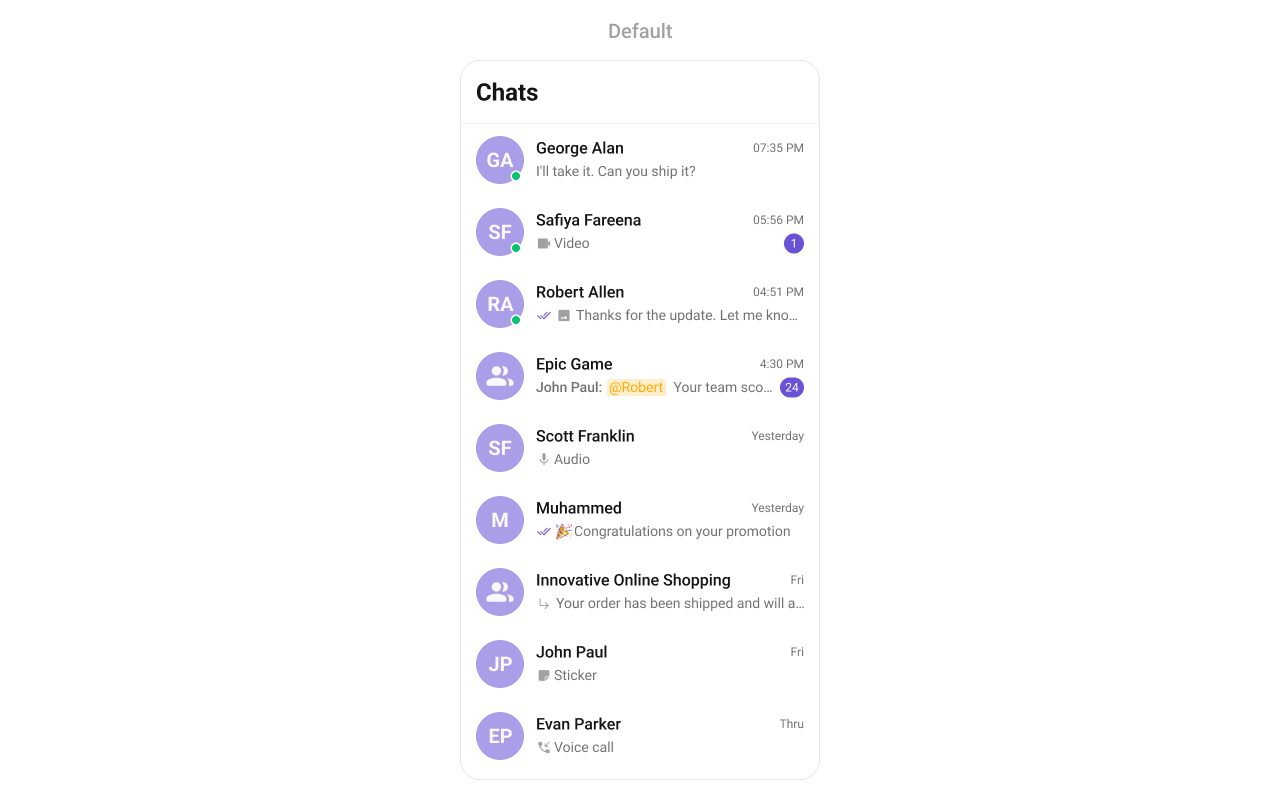
`CometChatConversations` renders a scrollable list of recent conversations with real-time updates for new messages, typing indicators, read receipts, and user presence.
 ***
## Where It Fits
`CometChatConversations` is a list component. It renders recent conversations and emits the selected `Conversation` via `onItemClick`. Wire it to `CometChatMessageHeader`, `CometChatMessageList`, and `CometChatMessageComposer` to build a standard chat layout.
```xml activity_chat.xml lines theme={null}
```
```kotlin lines theme={null}
val conversations = findViewById(R.id.conversations)
conversations.setOnItemClick { conversation ->
when (val entity = conversation.conversationWith) {
is User -> navigateToUserChat(entity)
is Group -> navigateToGroupChat(entity)
}
}
```
```kotlin lines theme={null}
CometChatConversations(
modifier = Modifier.fillMaxSize(),
onItemClick = { conversation ->
when (val entity = conversation.conversationWith) {
is User -> navigateToUserChat(entity)
is Group -> navigateToGroupChat(entity)
}
}
)
```
> See the [Conversation List + Message View](/ui-kit/android/v6/conversation-message-view) guide for a complete layout.
***
## Quick Start
Add to your layout XML:
```xml lines theme={null}
```
Or programmatically:
```kotlin lines theme={null}
override fun onCreate(savedInstanceState: Bundle?) {
super.onCreate(savedInstanceState)
setContentView(CometChatConversations(this))
}
```
```kotlin lines theme={null}
@Composable
fun ConversationsScreen() {
CometChatConversations(
modifier = Modifier.fillMaxSize()
)
}
```
Prerequisites: CometChat SDK initialized with `CometChatUIKit.init()`, a user logged in, and the UI Kit dependency added.
Or in a Fragment:
```kotlin lines theme={null}
override fun onCreateView(inflater: LayoutInflater, container: ViewGroup?, savedInstanceState: Bundle?): View {
return CometChatConversations(requireContext())
}
```
```kotlin lines theme={null}
override fun onCreateView(inflater: LayoutInflater, container: ViewGroup?, savedInstanceState: Bundle?): View {
return ComposeView(requireContext()).apply {
setContent { CometChatConversations() }
}
}
```
***
## Filtering Conversations
Pass a `ConversationsRequest.ConversationsRequestBuilder` to control what loads:
```kotlin lines theme={null}
conversations.setConversationsRequestBuilder(
ConversationsRequest.ConversationsRequestBuilder()
.setConversationType(CometChatConstants.CONVERSATION_TYPE_USER)
.setLimit(20)
)
```
```kotlin lines theme={null}
CometChatConversations(
conversationsRequestBuilder = ConversationsRequest.ConversationsRequestBuilder()
.setConversationType(CometChatConstants.CONVERSATION_TYPE_USER)
.setLimit(20)
)
```
### Filter Recipes
| Recipe | Builder method |
| ------------------------ | ------------------------------------------------------------- |
| Only user conversations | `.setConversationType(CONVERSATION_TYPE_USER)` |
| Only group conversations | `.setConversationType(CONVERSATION_TYPE_GROUP)` |
| Limit per page | `.setLimit(10)` |
| With tags | `.setTags(listOf("vip")).withTags(true)` |
| Filter by user tags | `.withUserAndGroupTags(true).setUserTags(listOf("premium"))` |
| Filter by group tags | `.withUserAndGroupTags(true).setGroupTags(listOf("support"))` |
Pass the builder object, not the result of `.build()`. The component calls `.build()` internally. Default page size is 30 with infinite scroll.
***
## Actions and Events
### Callback Methods
#### `onItemClick`
Fires when a conversation row is tapped. Primary navigation hook.
```kotlin lines theme={null}
conversations.setOnItemClick { conversation ->
// Navigate to chat screen
}
```
```kotlin lines theme={null}
CometChatConversations(
onItemClick = { conversation ->
// Navigate to chat screen
}
)
```
> Replaces the default item-click behavior. Your custom lambda executes instead of the built-in navigation.
#### `onItemLongClick`
Fires when a conversation row is long-pressed. Use for additional actions like delete or select.
```kotlin lines theme={null}
conversations.setOnItemLongClick { conversation ->
// Show context menu
}
```
```kotlin lines theme={null}
CometChatConversations(
onItemLongClick = { conversation ->
// Show context menu
}
)
```
#### `onBackPress`
Fires when the user presses the back button in the toolbar.
```kotlin lines theme={null}
conversations.setOnBackPress {
finish()
}
```
```kotlin lines theme={null}
CometChatConversations(
onBackPress = { /* navigate back */ }
)
```
#### `onSearchClick`
Fires when the user taps the search icon in the toolbar.
```kotlin lines theme={null}
conversations.setOnSearchClick {
// Open search screen
}
```
```kotlin lines theme={null}
CometChatConversations(
onSearchClick = { /* open search */ }
)
```
#### `onSelection`
Fires when conversations are selected/deselected in multi-select mode.
```kotlin lines theme={null}
conversations.setSelectionMode(UIKitConstants.SelectionMode.MULTIPLE)
conversations.setOnSelection { selectedConversations ->
updateToolbar(selectedConversations.size)
}
```
```kotlin lines theme={null}
CometChatConversations(
selectionMode = UIKitConstants.SelectionMode.MULTIPLE,
onSelection = { selectedConversations ->
updateToolbar(selectedConversations.size)
}
)
```
#### `onError`
Fires on internal errors (network failure, auth issue, SDK exception).
```kotlin lines theme={null}
conversations.setOnError { exception ->
Log.e("Conversations", "Error: ${exception.message}")
}
```
```kotlin lines theme={null}
CometChatConversations(
onError = { exception ->
Log.e("Conversations", "Error: ${exception.message}")
}
)
```
#### `onLoad`
Fires when the list is successfully fetched and loaded.
```kotlin lines theme={null}
conversations.setOnLoad { conversations ->
Log.d("Conversations", "Loaded ${conversations.size}")
}
```
```kotlin lines theme={null}
CometChatConversations(
onLoad = { conversations ->
Log.d("Conversations", "Loaded ${conversations.size}")
}
)
```
#### `onEmpty`
Fires when the list is empty after loading.
```kotlin lines theme={null}
conversations.setOnEmpty {
Log.d("Conversations", "No conversations")
}
```
```kotlin lines theme={null}
CometChatConversations(
onEmpty = { /* no conversations */ }
)
```
### Global Events
The component emits events via `CometChatEvents` that can be subscribed to from anywhere:
```kotlin lines theme={null}
viewModelScope.launch {
CometChatEvents.conversationEvents.collect { event ->
when (event) {
is CometChatConversationEvent.ConversationDeleted -> { /* handle */ }
is CometChatConversationEvent.ConversationUpdated -> { /* handle */ }
}
}
}
```
### SDK Events (Real-Time, Automatic)
The component listens to these SDK events internally. No manual setup needed.
| SDK Listener | Internal behavior |
| ------------------------------------------------------------------------------------------- | ---------------------------------------------------------------- |
| `onTextMessageReceived` / `onMediaMessageReceived` / `onCustomMessageReceived` | Moves conversation to top, updates last message and unread count |
| `onTypingStarted` / `onTypingEnded` | Shows/hides typing indicator in subtitle |
| `onMessagesDelivered` / `onMessagesRead` | Updates receipt indicators |
| `onUserOnline` / `onUserOffline` | Updates presence status dot |
| `onGroupMemberJoined` / `onGroupMemberLeft` / `onGroupMemberKicked` / `onGroupMemberBanned` | Updates group conversation metadata |
***
## Functionality
| Method (Kotlin XML) | Compose Parameter | Description |
| ---------------------------------------- | -------------------------------------- | ---------------------- |
| `setBackIconVisibility(View.VISIBLE)` | `hideBackIcon = false` | Toggle back button |
| `setToolbarVisibility(View.GONE)` | `hideToolbar = true` | Toggle toolbar |
| `setSearchBoxVisibility(View.GONE)` | `hideSearchBox = true` | Toggle search box |
| `setDisableSoundForMessages(true)` | `disableSoundForMessages = true` | Disable message sounds |
| `setCustomSoundForMessages(R.raw.sound)` | `customSoundForMessages = R.raw.sound` | Custom message sound |
| `setSelectionMode(MULTIPLE)` | `selectionMode = MULTIPLE` | Enable selection mode |
| `setTitle("Chats")` | `title = "Chats"` | Custom toolbar title |
| `setSearchPlaceholderText("Search...")` | `searchPlaceholderText = "Search..."` | Search placeholder |
***
## Custom View Slots
### Leading View
Replace the avatar / left section.
```kotlin lines theme={null}
conversations.setLeadingView(object : ConversationsViewHolderListener() {
override fun createView(context: Context, binding: CometchatConversationsListItemsBinding): View {
return ImageView(context).apply {
layoutParams = ViewGroup.LayoutParams(48.dp, 48.dp)
}
}
override fun bindView(
context: Context, createdView: View, conversation: Conversation,
typingIndicator: TypingIndicator?, holder: RecyclerView.ViewHolder,
conversations: List, position: Int
) {
val imageView = createdView as ImageView
// Load avatar image
}
})
```
```kotlin lines theme={null}
CometChatConversations(
leadingView = { conversation, typingIndicator ->
CometChatAvatar(
imageUrl = conversation.conversationWith?.avatar,
name = conversation.conversationWith?.name
)
}
)
```
### Title View
Replace the name / title text.
```kotlin lines theme={null}
conversations.setTitleView(object : ConversationsViewHolderListener() {
override fun createView(context: Context, binding: CometchatConversationsListItemsBinding): View {
return TextView(context)
}
override fun bindView(
context: Context, createdView: View, conversation: Conversation,
typingIndicator: TypingIndicator?, holder: RecyclerView.ViewHolder,
conversations: List, position: Int
) {
(createdView as TextView).text = conversation.conversationWith?.name ?: ""
}
})
```
```kotlin lines theme={null}
CometChatConversations(
titleView = { conversation, _ ->
Text(
text = conversation.conversationWith?.name ?: "",
style = CometChatTheme.typography.heading4Medium
)
}
)
```
### Subtitle View
Replace the last message preview.
```kotlin lines theme={null}
conversations.setSubtitleView(object : ConversationsViewHolderListener() {
override fun createView(context: Context, binding: CometchatConversationsListItemsBinding): View {
return TextView(context).apply { maxLines = 1; ellipsize = TextUtils.TruncateAt.END }
}
override fun bindView(
context: Context, createdView: View, conversation: Conversation,
typingIndicator: TypingIndicator?, holder: RecyclerView.ViewHolder,
conversations: List, position: Int
) {
val textView = createdView as TextView
if (typingIndicator != null) {
textView.text = "typing..."
} else {
textView.text = when (val msg = conversation.lastMessage) {
is TextMessage -> msg.text
is MediaMessage -> "📎 ${msg.attachment?.fileExtension ?: "Media"}"
else -> "New conversation"
}
}
}
})
```
```kotlin lines theme={null}
CometChatConversations(
subtitleView = { conversation, typingIndicator ->
val text = if (typingIndicator != null) "typing..." else {
when (val msg = conversation.lastMessage) {
is TextMessage -> msg.text ?: ""
is MediaMessage -> "📎 ${msg.attachment?.fileExtension ?: "Media"}"
else -> "New conversation"
}
}
Text(text, maxLines = 1, overflow = TextOverflow.Ellipsis)
}
)
```
### Trailing View
Replace the timestamp / badge / right section.
```kotlin lines theme={null}
conversations.setTrailingView(object : ConversationsViewHolderListener() {
override fun createView(context: Context, binding: CometchatConversationsListItemsBinding): View {
return TextView(context)
}
override fun bindView(
context: Context, createdView: View, conversation: Conversation,
typingIndicator: TypingIndicator?, holder: RecyclerView.ViewHolder,
conversations: List, position: Int
) {
(createdView as TextView).text = "${conversation.unreadMessageCount} unread"
}
})
```
```kotlin lines theme={null}
CometChatConversations(
trailingView = { conversation, _ ->
if (conversation.unreadMessageCount > 0) {
Badge { Text("${conversation.unreadMessageCount}") }
}
}
)
```
### State Views
```kotlin lines theme={null}
conversations.setEmptyView(customEmptyView)
conversations.setErrorView(customErrorView)
conversations.setLoadingView(customLoadingView)
```
```kotlin lines theme={null}
CometChatConversations(
emptyView = { Text("No conversations yet") },
errorView = { onRetry -> Button(onClick = onRetry) { Text("Retry") } },
loadingView = { CircularProgressIndicator() }
)
```
### Overflow Menu
```kotlin lines theme={null}
conversations.setOverflowMenu(ImageButton(context).apply {
setImageResource(R.drawable.ic_filter)
setOnClickListener { /* show filter */ }
})
```
```kotlin lines theme={null}
CometChatConversations(
overflowMenu = {
IconButton(onClick = { /* show filter */ }) {
Icon(painterResource(R.drawable.ic_filter), "Filter")
}
}
)
```
***
## Menu Options
```kotlin lines theme={null}
// Replace all options
conversations.setOptions { context, conversation ->
listOf(
CometChatPopupMenu.MenuItem(id = "archive", name = "Archive", onClick = { /* ... */ }),
CometChatPopupMenu.MenuItem(id = "mute", name = "Mute", onClick = { /* ... */ })
)
}
// Append to defaults
conversations.setAddOptions { context, conversation ->
listOf(
CometChatPopupMenu.MenuItem(id = "pin", name = "Pin", onClick = { /* ... */ })
)
}
```
```kotlin lines theme={null}
CometChatConversations(
options = { context, conversation ->
listOf(
MenuItem(id = "archive", name = "Archive", onClick = { /* ... */ }),
MenuItem(id = "mute", name = "Mute", onClick = { /* ... */ })
)
},
addOptions = { context, conversation ->
listOf(MenuItem(id = "pin", name = "Pin", onClick = { /* ... */ }))
}
)
```
***
## Common Patterns
### Minimal list — hide all chrome
```kotlin lines theme={null}
conversations.setToolbarVisibility(View.GONE)
conversations.setSearchBoxVisibility(View.GONE)
```
```kotlin lines theme={null}
CometChatConversations(
hideToolbar = true,
hideSearchBox = true
)
```
### Users-only conversations
```kotlin lines theme={null}
conversations.setConversationsRequestBuilder(
ConversationsRequest.ConversationsRequestBuilder()
.setConversationType(CometChatConstants.CONVERSATION_TYPE_USER)
)
```
```kotlin lines theme={null}
CometChatConversations(
conversationsRequestBuilder = ConversationsRequest.ConversationsRequestBuilder()
.setConversationType(CometChatConstants.CONVERSATION_TYPE_USER)
)
```
### Custom date formatting
```kotlin lines theme={null}
conversations.setDateTimeFormatter(object : DateTimeFormatterCallback {
override fun today(timestamp: Long) = "Today"
override fun yesterday(timestamp: Long) = "Yesterday"
override fun otherDays(timestamp: Long) = SimpleDateFormat("MMM d", Locale.getDefault()).format(Date(timestamp))
override fun time(timestamp: Long) = SimpleDateFormat("h:mm a", Locale.getDefault()).format(Date(timestamp))
override fun minutes(diff: Long, timestamp: Long) = "${diff}m ago"
override fun hours(diff: Long, timestamp: Long) = "${diff}h ago"
override fun lastWeek(timestamp: Long) = "Last week"
})
```
```kotlin lines theme={null}
CometChatConversations(
dateTimeFormatter = object : DateTimeFormatterCallback {
override fun today(timestamp: Long) = "Today"
override fun yesterday(timestamp: Long) = "Yesterday"
override fun otherDays(timestamp: Long) = SimpleDateFormat("MMM d", Locale.getDefault()).format(Date(timestamp))
override fun time(timestamp: Long) = SimpleDateFormat("h:mm a", Locale.getDefault()).format(Date(timestamp))
override fun minutes(diff: Long, timestamp: Long) = "${diff}m ago"
override fun hours(diff: Long, timestamp: Long) = "${diff}h ago"
override fun lastWeek(timestamp: Long) = "Last week"
}
)
```
***
## Advanced Methods
### Programmatic Selection
```kotlin lines theme={null}
// Enable selection
conversations.setSelectionMode(UIKitConstants.SelectionMode.MULTIPLE)
// Select a conversation
conversations.selectConversation(conversation, UIKitConstants.SelectionMode.MULTIPLE)
// Get selected
val selected = conversations.getSelectedConversations()
// Clear
conversations.clearSelection()
```
Selection is managed via the `selectionMode` and `onSelection` parameters. The component handles selection state internally.
### ViewModel Access
```kotlin lines theme={null}
val factory = CometChatConversationsViewModelFactory(
repository = MyCustomRepository() // optional
)
val viewModel = ViewModelProvider(this, factory)
.get(CometChatConversationsViewModel::class.java)
```
```kotlin lines theme={null}
conversations.setViewModel(viewModel)
```
```kotlin lines theme={null}
CometChatConversations(
conversationsViewModel = viewModel
)
```
See [ViewModel & Data](/ui-kit/android/v6/customization-viewmodel-data) for ListOperations, state observation, and custom repositories.
***
## Style
Define a custom style in `themes.xml`:
```xml themes.xml lines theme={null}
```
```kotlin lines theme={null}
CometChatConversations(
style = CometChatConversationsStyle.default().copy(
backgroundColor = Color(0xFFF5F5F5),
titleTextColor = Color(0xFF141414),
searchBoxStyle = CometChatSearchBoxStyle.default().copy(
backgroundColor = Color(0xFFFFFFFF)
),
itemStyle = CometChatConversationsItemStyle.default().copy(
backgroundColor = Color.White,
titleTextColor = Color(0xFF141414),
subtitleTextColor = Color(0xFF727272),
avatarStyle = CometChatAvatarStyle.default().copy(cornerRadius = 12.dp),
badgeStyle = CometChatBadgeStyle.default().copy(backgroundColor = Color(0xFFF76808)),
dateStyle = CometChatDateStyle.default().copy(textColor = Color(0xFFA1A1A1)),
receiptStyle = CometChatReceiptStyle.default().copy(),
statusIndicatorStyle = CometChatStatusIndicatorStyle.default().copy(),
typingIndicatorStyle = CometChatTypingIndicatorStyle.default().copy()
)
)
)
```
### Style Properties
| Property | Description |
| ----------------------------------- | -------------------------- |
| `backgroundColor` | List background color |
| `titleTextColor` | Toolbar title color |
| `searchBoxStyle` | Search box appearance |
| `itemStyle.backgroundColor` | Row background |
| `itemStyle.selectedBackgroundColor` | Selected row background |
| `itemStyle.titleTextColor` | Conversation name color |
| `itemStyle.subtitleTextColor` | Last message preview color |
| `itemStyle.separatorColor` | Row separator color |
| `itemStyle.avatarStyle` | Avatar appearance |
| `itemStyle.badgeStyle` | Unread badge appearance |
| `itemStyle.dateStyle` | Timestamp appearance |
| `itemStyle.receiptStyle` | Read receipt icons |
| `itemStyle.statusIndicatorStyle` | Online/offline indicator |
| `itemStyle.typingIndicatorStyle` | Typing indicator text |
| `itemStyle.mentionStyle` | Mention highlight style |
See [Component Styling](/ui-kit/android/v6/component-styling) for the full reference.
***
## Next Steps
Build a full chat layout with this component
Detailed styling reference with screenshots
Custom ViewModels, repositories, and ListOperations
Replace specific UI regions across all components
***
## Where It Fits
`CometChatConversations` is a list component. It renders recent conversations and emits the selected `Conversation` via `onItemClick`. Wire it to `CometChatMessageHeader`, `CometChatMessageList`, and `CometChatMessageComposer` to build a standard chat layout.
```xml activity_chat.xml lines theme={null}
```
```kotlin lines theme={null}
val conversations = findViewById(R.id.conversations)
conversations.setOnItemClick { conversation ->
when (val entity = conversation.conversationWith) {
is User -> navigateToUserChat(entity)
is Group -> navigateToGroupChat(entity)
}
}
```
```kotlin lines theme={null}
CometChatConversations(
modifier = Modifier.fillMaxSize(),
onItemClick = { conversation ->
when (val entity = conversation.conversationWith) {
is User -> navigateToUserChat(entity)
is Group -> navigateToGroupChat(entity)
}
}
)
```
> See the [Conversation List + Message View](/ui-kit/android/v6/conversation-message-view) guide for a complete layout.
***
## Quick Start
Add to your layout XML:
```xml lines theme={null}
```
Or programmatically:
```kotlin lines theme={null}
override fun onCreate(savedInstanceState: Bundle?) {
super.onCreate(savedInstanceState)
setContentView(CometChatConversations(this))
}
```
```kotlin lines theme={null}
@Composable
fun ConversationsScreen() {
CometChatConversations(
modifier = Modifier.fillMaxSize()
)
}
```
Prerequisites: CometChat SDK initialized with `CometChatUIKit.init()`, a user logged in, and the UI Kit dependency added.
Or in a Fragment:
```kotlin lines theme={null}
override fun onCreateView(inflater: LayoutInflater, container: ViewGroup?, savedInstanceState: Bundle?): View {
return CometChatConversations(requireContext())
}
```
```kotlin lines theme={null}
override fun onCreateView(inflater: LayoutInflater, container: ViewGroup?, savedInstanceState: Bundle?): View {
return ComposeView(requireContext()).apply {
setContent { CometChatConversations() }
}
}
```
***
## Filtering Conversations
Pass a `ConversationsRequest.ConversationsRequestBuilder` to control what loads:
```kotlin lines theme={null}
conversations.setConversationsRequestBuilder(
ConversationsRequest.ConversationsRequestBuilder()
.setConversationType(CometChatConstants.CONVERSATION_TYPE_USER)
.setLimit(20)
)
```
```kotlin lines theme={null}
CometChatConversations(
conversationsRequestBuilder = ConversationsRequest.ConversationsRequestBuilder()
.setConversationType(CometChatConstants.CONVERSATION_TYPE_USER)
.setLimit(20)
)
```
### Filter Recipes
| Recipe | Builder method |
| ------------------------ | ------------------------------------------------------------- |
| Only user conversations | `.setConversationType(CONVERSATION_TYPE_USER)` |
| Only group conversations | `.setConversationType(CONVERSATION_TYPE_GROUP)` |
| Limit per page | `.setLimit(10)` |
| With tags | `.setTags(listOf("vip")).withTags(true)` |
| Filter by user tags | `.withUserAndGroupTags(true).setUserTags(listOf("premium"))` |
| Filter by group tags | `.withUserAndGroupTags(true).setGroupTags(listOf("support"))` |
Pass the builder object, not the result of `.build()`. The component calls `.build()` internally. Default page size is 30 with infinite scroll.
***
## Actions and Events
### Callback Methods
#### `onItemClick`
Fires when a conversation row is tapped. Primary navigation hook.
```kotlin lines theme={null}
conversations.setOnItemClick { conversation ->
// Navigate to chat screen
}
```
```kotlin lines theme={null}
CometChatConversations(
onItemClick = { conversation ->
// Navigate to chat screen
}
)
```
> Replaces the default item-click behavior. Your custom lambda executes instead of the built-in navigation.
#### `onItemLongClick`
Fires when a conversation row is long-pressed. Use for additional actions like delete or select.
```kotlin lines theme={null}
conversations.setOnItemLongClick { conversation ->
// Show context menu
}
```
```kotlin lines theme={null}
CometChatConversations(
onItemLongClick = { conversation ->
// Show context menu
}
)
```
#### `onBackPress`
Fires when the user presses the back button in the toolbar.
```kotlin lines theme={null}
conversations.setOnBackPress {
finish()
}
```
```kotlin lines theme={null}
CometChatConversations(
onBackPress = { /* navigate back */ }
)
```
#### `onSearchClick`
Fires when the user taps the search icon in the toolbar.
```kotlin lines theme={null}
conversations.setOnSearchClick {
// Open search screen
}
```
```kotlin lines theme={null}
CometChatConversations(
onSearchClick = { /* open search */ }
)
```
#### `onSelection`
Fires when conversations are selected/deselected in multi-select mode.
```kotlin lines theme={null}
conversations.setSelectionMode(UIKitConstants.SelectionMode.MULTIPLE)
conversations.setOnSelection { selectedConversations ->
updateToolbar(selectedConversations.size)
}
```
```kotlin lines theme={null}
CometChatConversations(
selectionMode = UIKitConstants.SelectionMode.MULTIPLE,
onSelection = { selectedConversations ->
updateToolbar(selectedConversations.size)
}
)
```
#### `onError`
Fires on internal errors (network failure, auth issue, SDK exception).
```kotlin lines theme={null}
conversations.setOnError { exception ->
Log.e("Conversations", "Error: ${exception.message}")
}
```
```kotlin lines theme={null}
CometChatConversations(
onError = { exception ->
Log.e("Conversations", "Error: ${exception.message}")
}
)
```
#### `onLoad`
Fires when the list is successfully fetched and loaded.
```kotlin lines theme={null}
conversations.setOnLoad { conversations ->
Log.d("Conversations", "Loaded ${conversations.size}")
}
```
```kotlin lines theme={null}
CometChatConversations(
onLoad = { conversations ->
Log.d("Conversations", "Loaded ${conversations.size}")
}
)
```
#### `onEmpty`
Fires when the list is empty after loading.
```kotlin lines theme={null}
conversations.setOnEmpty {
Log.d("Conversations", "No conversations")
}
```
```kotlin lines theme={null}
CometChatConversations(
onEmpty = { /* no conversations */ }
)
```
### Global Events
The component emits events via `CometChatEvents` that can be subscribed to from anywhere:
```kotlin lines theme={null}
viewModelScope.launch {
CometChatEvents.conversationEvents.collect { event ->
when (event) {
is CometChatConversationEvent.ConversationDeleted -> { /* handle */ }
is CometChatConversationEvent.ConversationUpdated -> { /* handle */ }
}
}
}
```
### SDK Events (Real-Time, Automatic)
The component listens to these SDK events internally. No manual setup needed.
| SDK Listener | Internal behavior |
| ------------------------------------------------------------------------------------------- | ---------------------------------------------------------------- |
| `onTextMessageReceived` / `onMediaMessageReceived` / `onCustomMessageReceived` | Moves conversation to top, updates last message and unread count |
| `onTypingStarted` / `onTypingEnded` | Shows/hides typing indicator in subtitle |
| `onMessagesDelivered` / `onMessagesRead` | Updates receipt indicators |
| `onUserOnline` / `onUserOffline` | Updates presence status dot |
| `onGroupMemberJoined` / `onGroupMemberLeft` / `onGroupMemberKicked` / `onGroupMemberBanned` | Updates group conversation metadata |
***
## Functionality
| Method (Kotlin XML) | Compose Parameter | Description |
| ---------------------------------------- | -------------------------------------- | ---------------------- |
| `setBackIconVisibility(View.VISIBLE)` | `hideBackIcon = false` | Toggle back button |
| `setToolbarVisibility(View.GONE)` | `hideToolbar = true` | Toggle toolbar |
| `setSearchBoxVisibility(View.GONE)` | `hideSearchBox = true` | Toggle search box |
| `setDisableSoundForMessages(true)` | `disableSoundForMessages = true` | Disable message sounds |
| `setCustomSoundForMessages(R.raw.sound)` | `customSoundForMessages = R.raw.sound` | Custom message sound |
| `setSelectionMode(MULTIPLE)` | `selectionMode = MULTIPLE` | Enable selection mode |
| `setTitle("Chats")` | `title = "Chats"` | Custom toolbar title |
| `setSearchPlaceholderText("Search...")` | `searchPlaceholderText = "Search..."` | Search placeholder |
***
## Custom View Slots
### Leading View
Replace the avatar / left section.
```kotlin lines theme={null}
conversations.setLeadingView(object : ConversationsViewHolderListener() {
override fun createView(context: Context, binding: CometchatConversationsListItemsBinding): View {
return ImageView(context).apply {
layoutParams = ViewGroup.LayoutParams(48.dp, 48.dp)
}
}
override fun bindView(
context: Context, createdView: View, conversation: Conversation,
typingIndicator: TypingIndicator?, holder: RecyclerView.ViewHolder,
conversations: List, position: Int
) {
val imageView = createdView as ImageView
// Load avatar image
}
})
```
```kotlin lines theme={null}
CometChatConversations(
leadingView = { conversation, typingIndicator ->
CometChatAvatar(
imageUrl = conversation.conversationWith?.avatar,
name = conversation.conversationWith?.name
)
}
)
```
### Title View
Replace the name / title text.
```kotlin lines theme={null}
conversations.setTitleView(object : ConversationsViewHolderListener() {
override fun createView(context: Context, binding: CometchatConversationsListItemsBinding): View {
return TextView(context)
}
override fun bindView(
context: Context, createdView: View, conversation: Conversation,
typingIndicator: TypingIndicator?, holder: RecyclerView.ViewHolder,
conversations: List, position: Int
) {
(createdView as TextView).text = conversation.conversationWith?.name ?: ""
}
})
```
```kotlin lines theme={null}
CometChatConversations(
titleView = { conversation, _ ->
Text(
text = conversation.conversationWith?.name ?: "",
style = CometChatTheme.typography.heading4Medium
)
}
)
```
### Subtitle View
Replace the last message preview.
```kotlin lines theme={null}
conversations.setSubtitleView(object : ConversationsViewHolderListener() {
override fun createView(context: Context, binding: CometchatConversationsListItemsBinding): View {
return TextView(context).apply { maxLines = 1; ellipsize = TextUtils.TruncateAt.END }
}
override fun bindView(
context: Context, createdView: View, conversation: Conversation,
typingIndicator: TypingIndicator?, holder: RecyclerView.ViewHolder,
conversations: List, position: Int
) {
val textView = createdView as TextView
if (typingIndicator != null) {
textView.text = "typing..."
} else {
textView.text = when (val msg = conversation.lastMessage) {
is TextMessage -> msg.text
is MediaMessage -> "📎 ${msg.attachment?.fileExtension ?: "Media"}"
else -> "New conversation"
}
}
}
})
```
```kotlin lines theme={null}
CometChatConversations(
subtitleView = { conversation, typingIndicator ->
val text = if (typingIndicator != null) "typing..." else {
when (val msg = conversation.lastMessage) {
is TextMessage -> msg.text ?: ""
is MediaMessage -> "📎 ${msg.attachment?.fileExtension ?: "Media"}"
else -> "New conversation"
}
}
Text(text, maxLines = 1, overflow = TextOverflow.Ellipsis)
}
)
```
### Trailing View
Replace the timestamp / badge / right section.
```kotlin lines theme={null}
conversations.setTrailingView(object : ConversationsViewHolderListener() {
override fun createView(context: Context, binding: CometchatConversationsListItemsBinding): View {
return TextView(context)
}
override fun bindView(
context: Context, createdView: View, conversation: Conversation,
typingIndicator: TypingIndicator?, holder: RecyclerView.ViewHolder,
conversations: List, position: Int
) {
(createdView as TextView).text = "${conversation.unreadMessageCount} unread"
}
})
```
```kotlin lines theme={null}
CometChatConversations(
trailingView = { conversation, _ ->
if (conversation.unreadMessageCount > 0) {
Badge { Text("${conversation.unreadMessageCount}") }
}
}
)
```
### State Views
```kotlin lines theme={null}
conversations.setEmptyView(customEmptyView)
conversations.setErrorView(customErrorView)
conversations.setLoadingView(customLoadingView)
```
```kotlin lines theme={null}
CometChatConversations(
emptyView = { Text("No conversations yet") },
errorView = { onRetry -> Button(onClick = onRetry) { Text("Retry") } },
loadingView = { CircularProgressIndicator() }
)
```
### Overflow Menu
```kotlin lines theme={null}
conversations.setOverflowMenu(ImageButton(context).apply {
setImageResource(R.drawable.ic_filter)
setOnClickListener { /* show filter */ }
})
```
```kotlin lines theme={null}
CometChatConversations(
overflowMenu = {
IconButton(onClick = { /* show filter */ }) {
Icon(painterResource(R.drawable.ic_filter), "Filter")
}
}
)
```
***
## Menu Options
```kotlin lines theme={null}
// Replace all options
conversations.setOptions { context, conversation ->
listOf(
CometChatPopupMenu.MenuItem(id = "archive", name = "Archive", onClick = { /* ... */ }),
CometChatPopupMenu.MenuItem(id = "mute", name = "Mute", onClick = { /* ... */ })
)
}
// Append to defaults
conversations.setAddOptions { context, conversation ->
listOf(
CometChatPopupMenu.MenuItem(id = "pin", name = "Pin", onClick = { /* ... */ })
)
}
```
```kotlin lines theme={null}
CometChatConversations(
options = { context, conversation ->
listOf(
MenuItem(id = "archive", name = "Archive", onClick = { /* ... */ }),
MenuItem(id = "mute", name = "Mute", onClick = { /* ... */ })
)
},
addOptions = { context, conversation ->
listOf(MenuItem(id = "pin", name = "Pin", onClick = { /* ... */ }))
}
)
```
***
## Common Patterns
### Minimal list — hide all chrome
```kotlin lines theme={null}
conversations.setToolbarVisibility(View.GONE)
conversations.setSearchBoxVisibility(View.GONE)
```
```kotlin lines theme={null}
CometChatConversations(
hideToolbar = true,
hideSearchBox = true
)
```
### Users-only conversations
```kotlin lines theme={null}
conversations.setConversationsRequestBuilder(
ConversationsRequest.ConversationsRequestBuilder()
.setConversationType(CometChatConstants.CONVERSATION_TYPE_USER)
)
```
```kotlin lines theme={null}
CometChatConversations(
conversationsRequestBuilder = ConversationsRequest.ConversationsRequestBuilder()
.setConversationType(CometChatConstants.CONVERSATION_TYPE_USER)
)
```
### Custom date formatting
```kotlin lines theme={null}
conversations.setDateTimeFormatter(object : DateTimeFormatterCallback {
override fun today(timestamp: Long) = "Today"
override fun yesterday(timestamp: Long) = "Yesterday"
override fun otherDays(timestamp: Long) = SimpleDateFormat("MMM d", Locale.getDefault()).format(Date(timestamp))
override fun time(timestamp: Long) = SimpleDateFormat("h:mm a", Locale.getDefault()).format(Date(timestamp))
override fun minutes(diff: Long, timestamp: Long) = "${diff}m ago"
override fun hours(diff: Long, timestamp: Long) = "${diff}h ago"
override fun lastWeek(timestamp: Long) = "Last week"
})
```
```kotlin lines theme={null}
CometChatConversations(
dateTimeFormatter = object : DateTimeFormatterCallback {
override fun today(timestamp: Long) = "Today"
override fun yesterday(timestamp: Long) = "Yesterday"
override fun otherDays(timestamp: Long) = SimpleDateFormat("MMM d", Locale.getDefault()).format(Date(timestamp))
override fun time(timestamp: Long) = SimpleDateFormat("h:mm a", Locale.getDefault()).format(Date(timestamp))
override fun minutes(diff: Long, timestamp: Long) = "${diff}m ago"
override fun hours(diff: Long, timestamp: Long) = "${diff}h ago"
override fun lastWeek(timestamp: Long) = "Last week"
}
)
```
***
## Advanced Methods
### Programmatic Selection
```kotlin lines theme={null}
// Enable selection
conversations.setSelectionMode(UIKitConstants.SelectionMode.MULTIPLE)
// Select a conversation
conversations.selectConversation(conversation, UIKitConstants.SelectionMode.MULTIPLE)
// Get selected
val selected = conversations.getSelectedConversations()
// Clear
conversations.clearSelection()
```
Selection is managed via the `selectionMode` and `onSelection` parameters. The component handles selection state internally.
### ViewModel Access
```kotlin lines theme={null}
val factory = CometChatConversationsViewModelFactory(
repository = MyCustomRepository() // optional
)
val viewModel = ViewModelProvider(this, factory)
.get(CometChatConversationsViewModel::class.java)
```
```kotlin lines theme={null}
conversations.setViewModel(viewModel)
```
```kotlin lines theme={null}
CometChatConversations(
conversationsViewModel = viewModel
)
```
See [ViewModel & Data](/ui-kit/android/v6/customization-viewmodel-data) for ListOperations, state observation, and custom repositories.
***
## Style
Define a custom style in `themes.xml`:
```xml themes.xml lines theme={null}
```
```kotlin lines theme={null}
CometChatConversations(
style = CometChatConversationsStyle.default().copy(
backgroundColor = Color(0xFFF5F5F5),
titleTextColor = Color(0xFF141414),
searchBoxStyle = CometChatSearchBoxStyle.default().copy(
backgroundColor = Color(0xFFFFFFFF)
),
itemStyle = CometChatConversationsItemStyle.default().copy(
backgroundColor = Color.White,
titleTextColor = Color(0xFF141414),
subtitleTextColor = Color(0xFF727272),
avatarStyle = CometChatAvatarStyle.default().copy(cornerRadius = 12.dp),
badgeStyle = CometChatBadgeStyle.default().copy(backgroundColor = Color(0xFFF76808)),
dateStyle = CometChatDateStyle.default().copy(textColor = Color(0xFFA1A1A1)),
receiptStyle = CometChatReceiptStyle.default().copy(),
statusIndicatorStyle = CometChatStatusIndicatorStyle.default().copy(),
typingIndicatorStyle = CometChatTypingIndicatorStyle.default().copy()
)
)
)
```
### Style Properties
| Property | Description |
| ----------------------------------- | -------------------------- |
| `backgroundColor` | List background color |
| `titleTextColor` | Toolbar title color |
| `searchBoxStyle` | Search box appearance |
| `itemStyle.backgroundColor` | Row background |
| `itemStyle.selectedBackgroundColor` | Selected row background |
| `itemStyle.titleTextColor` | Conversation name color |
| `itemStyle.subtitleTextColor` | Last message preview color |
| `itemStyle.separatorColor` | Row separator color |
| `itemStyle.avatarStyle` | Avatar appearance |
| `itemStyle.badgeStyle` | Unread badge appearance |
| `itemStyle.dateStyle` | Timestamp appearance |
| `itemStyle.receiptStyle` | Read receipt icons |
| `itemStyle.statusIndicatorStyle` | Online/offline indicator |
| `itemStyle.typingIndicatorStyle` | Typing indicator text |
| `itemStyle.mentionStyle` | Mention highlight style |
See [Component Styling](/ui-kit/android/v6/component-styling) for the full reference.
***
## Next Steps
Build a full chat layout with this component
Detailed styling reference with screenshots
Custom ViewModels, repositories, and ListOperations
Replace specific UI regions across all components