> ## Documentation Index
> Fetch the complete documentation index at: https://cometchat-22654f5b-docs-agent-in-group-react-v6.mintlify.site/llms.txt
> Use this file to discover all available pages before exploring further.

# Multi Tab Chat UI Guide

> Multi Tab Chat UI Guide — CometChat integration guide.

In this guide you will learn how to create a tabbed layout component using [bottom navigation](https://m2.material.io/components/bottom-navigation#using-tabs) to use widgets like [CometChatUsersWithMessages](/ui-kit/android/v4/users-with-messages), [CometChatGroupsWithMessages](/ui-kit/android/v4/groups-with-messages) and [CometChatConversationsWithMessages](/ui-kit/android/v4/users-with-messages) simultaneously.

<Note>
  You need to create an account with CometChat to use the components.

  Also, ensure initializing CometChatUIKit first and logging in correctly before trying to render any component from the UI Kit package.

  Please make sure you have followed our [Integration](/ui-kit/android/v4/getting-started) guidelines.
</Note>

Without further ado, let's get into how we can build this thing.

* First, lets create a Activity, lets call it CometChatUiActivity and add the following code into the xml file of the activity

<Tabs>
  <Tab title="XML">
    ```xml theme={null}
    <?xml version="1.0" encoding="utf-8"?>
    <LinearLayout xmlns:android="http://schemas.android.com/apk/res/android"
        xmlns:app="http://schemas.android.com/apk/res-auto"
        android:layout_width="match_parent"
        android:layout_height="match_parent"
        android:orientation="vertical">

        <LinearLayout
            android:id="@+id/container"
            android:layout_width="match_parent"
            android:layout_height="0dp"
            android:layout_weight="1"
            android:orientation="vertical" />

        <com.google.android.material.bottomnavigation.BottomNavigationView
            android:id="@+id/bottomNavigationView"
            android:layout_width="match_parent"
            android:layout_height="wrap_content"
            android:background="@android:color/white"
            android:minHeight="60dp"
            app:itemIconTint="@color/selected_item"
            app:itemTextAppearanceActive="@style/Subtitle2"
            app:itemTextColor="@color/selected_item"
            app:menu="@menu/bottom_nav_menu_item"
            app:tabIndicator="@null"
            app:tabMinWidth="72dp"
            app:tabPaddingBottom="0dp"
            app:tabPaddingEnd="0dp"
            app:tabPaddingStart="0dp"
            app:tabPaddingTop="0dp" />
    </LinearLayout>
    ```
  </Tab>
</Tabs>

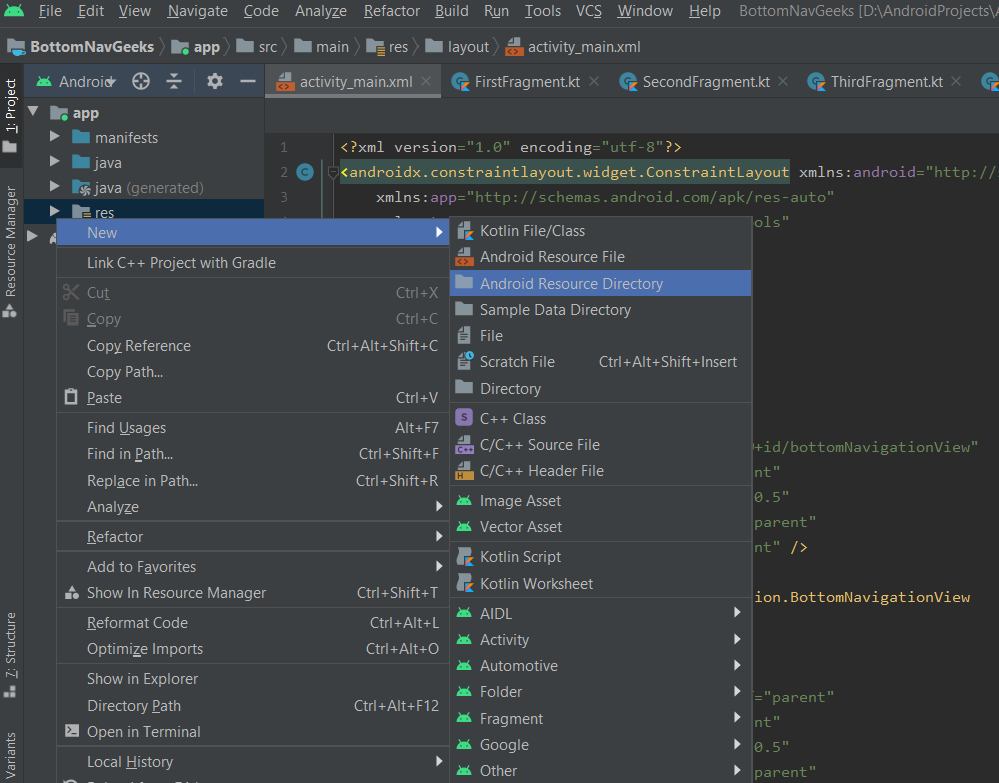
Now lets create menu that need to be shown on a Bottom navigation view. To create a **Menu**, first, create a **Menu Directory** **by clicking on the\_** **app** ***->*** **\_ res**(right-click) ->\_ ***New*** *->* ***Android Resource Directory*** *and select* ***Menu*** *in the* ***Resource Type***.\_
<Frame>
  <img src="https://mintcdn.com/cometchat-22654f5b-docs-agent-in-group-react-v6/8U2-5SWHI94obVDJ/images/9a5c9db2-l9edombe1wtdvkqfyipwq2qk1clm4p1k2h0iuxev0j1pmnwh91sg6tl3lmz18ub4-bd222baa524cebeb4e3acc981edfcc62.png?fit=max&auto=format&n=8U2-5SWHI94obVDJ&q=85&s=6a1fec0897448246bb35c8635281fc38" width="999" height="783" data-path="images/9a5c9db2-l9edombe1wtdvkqfyipwq2qk1clm4p1k2h0iuxev0j1pmnwh91sg6tl3lmz18ub4-bd222baa524cebeb4e3acc981edfcc62.png" />
</Frame>

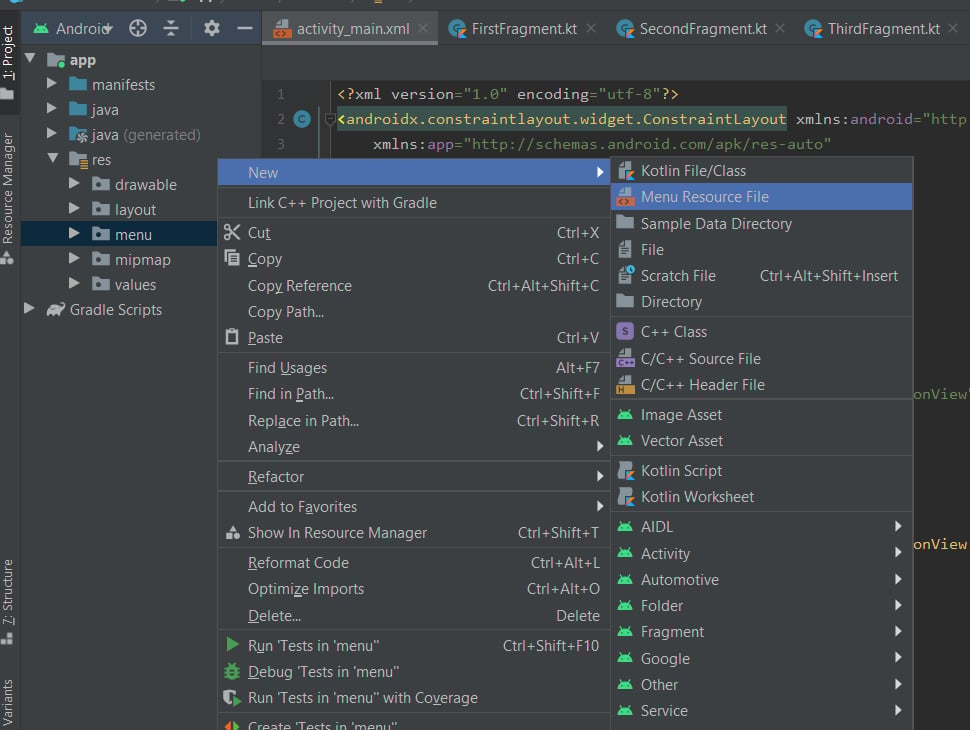
To create a **Menu Resource File** , click on the **app** -> **res** -> **menu**(right-click) -> **New** -> **Menu Resource File** and name it **bottom\_nav\_menu\_item**.
<Frame>
  <img src="https://mintcdn.com/cometchat-22654f5b-docs-agent-in-group-react-v6/Kv5z_j0TcKGMfIHt/images/c4f86470-zb9hggzii3w01gdsa6je0kaw0qy7ebduke22io84jj2159dflf39t22ofkhcmjtq-992f6c9d9ee89095dfd15fefaf3775c3.png?fit=max&auto=format&n=Kv5z_j0TcKGMfIHt&q=85&s=15d02909caf4422021dccf79ed619be0" width="970" height="730" data-path="images/c4f86470-zb9hggzii3w01gdsa6je0kaw0qy7ebduke22io84jj2159dflf39t22ofkhcmjtq-992f6c9d9ee89095dfd15fefaf3775c3.png" />
</Frame>

add the below code in **bottom**\*\*\_nav\_menu\_item\*\*

<Tabs>
  <Tab title="XML">
    ```xml theme={null}
    <?xml version="1.0" encoding="utf-8"?>
    <menu xmlns:android="http://schemas.android.com/apk/res/android">
        <item
            android:id="@+id/chat"
            android:title="@string/chats"
            android:icon="@drawable/cc_ic_chats"/>
        <item
            android:id="@+id/user"
            android:title="@string/users"
            android:icon="@drawable/cc_ic_users"/>
        <item
            android:id="@+id/group"
            android:title="@string/groups"
            android:icon="@drawable/cc_ic_groups"/>
    </menu>
    ```
  </Tab>
</Tabs>

similarly we need to create a **color directory** and need to add a color file with the below code init

<Tabs>
  <Tab title="XML">
    ```xml theme={null}
    <?xml version="1.0" encoding="utf-8"?>
    <selector xmlns:android="http://schemas.android.com/apk/res/android">
        <item android:state_checked="true" android:color="@color/primary" />
        <item android:color="@color/accent400"  />
    </selector>
    ```
  </Tab>
</Tabs>

Now create 4 Fragments and load `CometChatConversationsWithMessages`, `CometChatUsersWithMessages`, `CometChatGroupsWithMessages`and `CometChatCallHistoryWithDetails` individually in each of them.

ConversationsWithMessagesFragment.java

<Tabs>
  <Tab title="Java">
    ```java theme={null}
    public class ConversationsWithMessagesFragment extends Fragment {

        @Override
        public View onCreateView(LayoutInflater inflater, ViewGroup container,
                                 Bundle savedInstanceState) {
            // Inflate the layout for this fragment
            return inflater.inflate(R.layout.fragment_conversation_with_messages, container, false);
        }
    }
    ```
  </Tab>
</Tabs>

<Tabs>
  <Tab title="XML">
    ```xml theme={null}
    <?xml version="1.0" encoding="utf-8"?>
    <FrameLayout xmlns:android="http://schemas.android.com/apk/res/android"
        xmlns:tools="http://schemas.android.com/tools"
        android:layout_width="match_parent"
        android:layout_height="match_parent"
        tools:context=".fragments.conversations.ConversationsWithMessagesFragment">

        <com.cometchat.chatuikit.conversationswithmessages.CometChatConversationWithMessages
            android:id="@+id/conversationWithMessages"
            android:layout_width="match_parent"
            android:layout_height="match_parent" />

    </FrameLayout>
    ```
  </Tab>
</Tabs>

UsersWithMessagesFragment.java

<Tabs>
  <Tab title="Java">
    ```java theme={null}
    public class UsersWithMessagesFragment extends Fragment {


        @Override
        public View onCreateView(LayoutInflater inflater, ViewGroup container,
                                 Bundle savedInstanceState) {
            // Inflate the layout for this fragment
            return inflater.inflate(R.layout.fragment_users_with_messages, container, false);
        }
    }
    ```
  </Tab>
</Tabs>

<Tabs>
  <Tab title="XML">
    ```xml theme={null}
    <?xml version="1.0" encoding="utf-8"?>
    <FrameLayout xmlns:android="http://schemas.android.com/apk/res/android"
        xmlns:tools="http://schemas.android.com/tools"
        android:layout_width="match_parent"
        android:layout_height="match_parent"
        tools:context=".fragments.users.UsersWithMessagesFragment">

        <com.cometchat.chatuikit.userswithmessages.CometChatUsersWithMessages
            android:id="@+id/userWithMessages"
            android:layout_width="match_parent"
            android:layout_height="match_parent" />

    </FrameLayout>
    ```
  </Tab>
</Tabs>

GroupsWithMessagesFragment.java

<Tabs>
  <Tab title="Java">
    ```java theme={null}
    public class GroupsWithMessagesFragment extends Fragment {

        @Override
        public View onCreateView(LayoutInflater inflater, ViewGroup container,
                                 Bundle savedInstanceState) {
            // Inflate the layout for this fragment
            return inflater.inflate(R.layout.fragment_groups_with_messages, container, false);
        }
    }
    ```
  </Tab>
</Tabs>

<Tabs>
  <Tab title="XML">
    ```xml theme={null}
    <?xml version="1.0" encoding="utf-8"?>
    <FrameLayout xmlns:android="http://schemas.android.com/apk/res/android"
        xmlns:tools="http://schemas.android.com/tools"
        android:layout_width="match_parent"
        android:layout_height="match_parent"
        tools:context=".fragments.groups.GroupsWithMessagesFragment">

        <com.cometchat.chatuikit.groupswithmessages.CometChatGroupsWithMessages
            android:id="@+id/groupWithMessages"
            android:layout_width="match_parent"
            android:layout_height="match_parent" />

    </FrameLayout>
    ```
  </Tab>
</Tabs>

Now in CometChatUiActivity add the below code.

<Tabs>
  <Tab title="Java">
    ```java theme={null}
    import android.os.Bundle;

    import androidx.appcompat.app.AppCompatActivity;
    import androidx.fragment.app.Fragment;

    import com.cometchat.pro.javasampleapp.R;
    import com.cometchat.pro.javasampleapp.fragments.calls.CallHistoryWithDetailsFragment;
    import com.cometchat.pro.javasampleapp.fragments.conversations.ConversationsWithMessagesFragment;
    import com.cometchat.pro.javasampleapp.fragments.groups.GroupsWithMessagesFragment;
    import com.cometchat.pro.javasampleapp.fragments.users.UsersWithMessagesFragment;
    import com.google.android.material.bottomnavigation.BottomNavigationView;

    public class CometChatUiActivity extends AppCompatActivity {

        private BottomNavigationView bottomNavigationView;

        @Override
        protected void onCreate(Bundle savedInstanceState) {
            super.onCreate(savedInstanceState);
            setContentView(R.layout.activity_comet_chat_ui);

            bottomNavigationView = findViewById(R.id.bottomNavigationView);
            loadFragment(new ConversationsWithMessagesFragment());
            bottomNavigationView.setOnItemSelectedListener(item -> {
                switch (item.getItemId()) {
                    case R.id.chat:
                        loadFragment(new ConversationsWithMessagesFragment());
                        break;
                    case R.id.user:
                        loadFragment(new UsersWithMessagesFragment());
                        break;
                    case R.id.group:
                        loadFragment(new GroupsWithMessagesFragment());
                        break;
                }
                return true;
            });
            bottomNavigationView.setSelectedItemId(R.id.chat);
        }

        private void loadFragment(Fragment fragment) {
            if (fragment != null)
                getSupportFragmentManager().beginTransaction().replace(R.id.container, fragment).commit();
        }
    }
    ```
  </Tab>
</Tabs>

Yippee 🎉 !!! We have successfully built a CometChatUi. 🎉
