> ## Documentation Index
> Fetch the complete documentation index at: https://cometchat-22654f5b-docs-agent-in-group-react-v6.mintlify.site/llms.txt
> Use this file to discover all available pages before exploring further.
# AI Agent Integration
> Enable AI-powered conversational assistance with chat history, contextual responses, and seamless handoffs.
| Field | Value |
| -------------- | ---------------------------------------------------------------------------------------------------------------------------------------------------------------- |
| Package | `com.cometchat:chat-uikit-android` |
| Key components | `CometChatAIAssistantChatHistory`, `CometChatMessageList`, `CometChatMessageComposer`, `CometChatMessageHeader` |
| Purpose | Enable AI-powered conversational assistance with chat history, contextual responses, and seamless handoffs. |
| Related | [AI Assistant Chat History](/ui-kit/android/ai-assistant-chat-history), [AI Features](/ui-kit/android/ai-features), [All Guides](/ui-kit/android/guide-overview) |
Enable intelligent conversational AI capabilities in your Android app using CometChat UIKit v5 with AI Agent integration:
* **AI Assistant Chat History**
* **Chat History Management**
* **Contextual Responses**
* **Agent Detection**
* **Seamless Handoffs**
Transform your chat experience with AI-powered assistance that provides intelligent responses and offers seamless integration with your existing chat infrastructure.
**1:1 conversations only.** AI Agents currently respond only in one-on-one conversations between an end user and the agent user. They do not respond to messages sent in groups, even if the agent user is added as a member or owner. Group support is on the roadmap — share your use case on [feedback.cometchat.com](https://feedback.cometchat.com).
## Overview
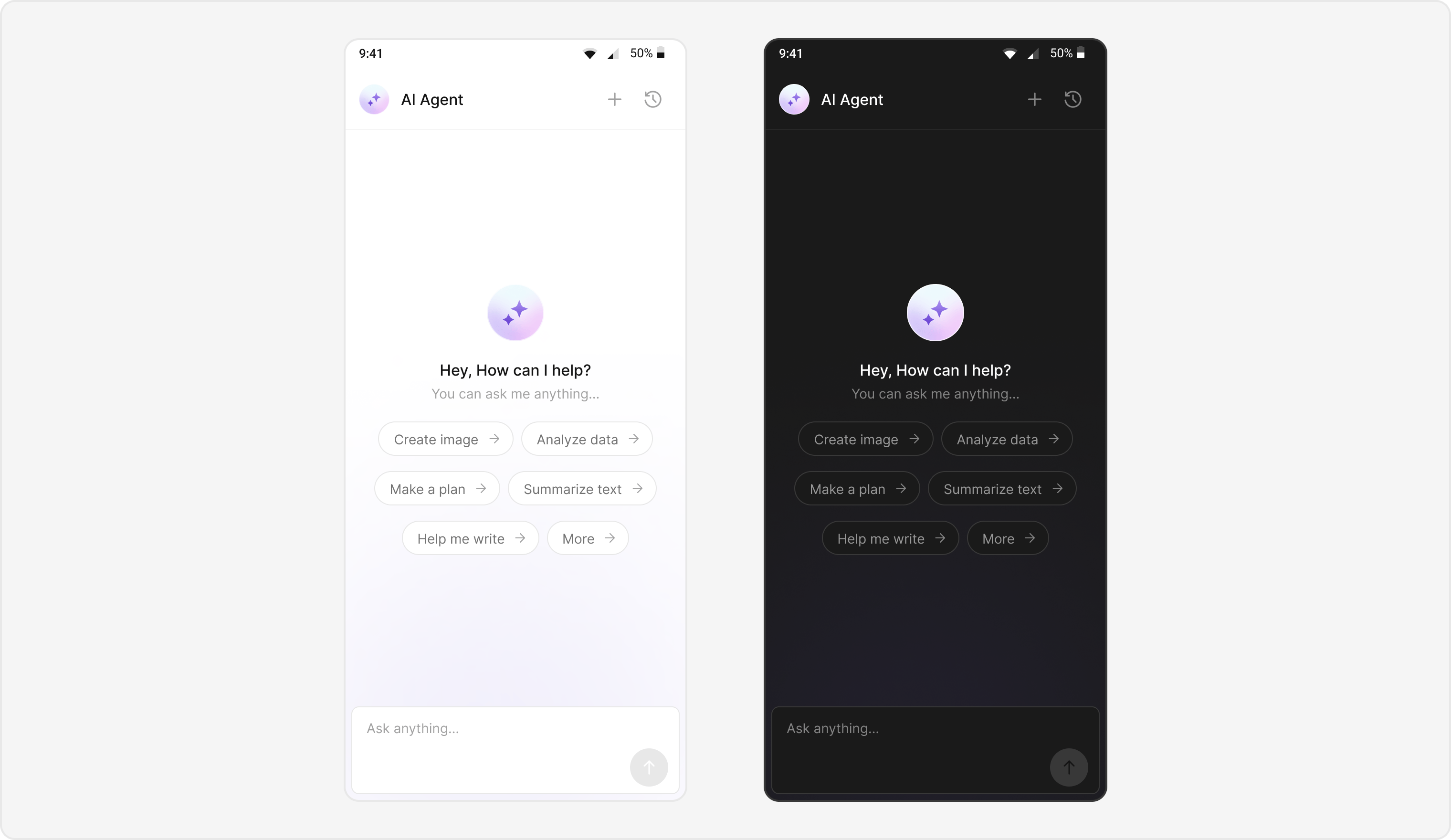
Users can interact with AI agents through a dedicated chat interface that:
* Provides intelligent responses based on conversation context.
* Maintains chat history for continuity.
* Seamlessly integrates with your existing user chat system.
The AI Agent chat interface provides a familiar messaging experience enhanced with AI capabilities, accessible through your main chat flow or as a standalone feature.
 ## Prerequisites
* Android Studio project with **cometchat/cometchat-uikit-android** and **cometchat/chat-sdk-android** in `build.gradle`.
* Internet permission in `AndroidManifest.xml`.
* Valid CometChat **App ID**, **Region**, and **Auth Key** configured via `UIKitSettings`.
* User logged in with `CometChatUIKit.login()`.
* AI Agent configured in your CometChat dashboard.
## Components
| Component / Class | Role |
| :-------------------------------- | :----------------------------------------- |
| `AIAssistantChatActivity` | Main activity for AI agent chat. |
| `CometChatAIAssistantChatHistory` | Displays previous AI conversation history. |
| `CometChatMessageList` | Shows AI messages with threading support. |
| `CometChatMessageComposer` | Input interface for AI conversations. |
| `CometChatMessageHeader` | Header with AI agent info and controls. |
## Integration Steps
### Step 1 - Activity Setup
Create the AI Assistant chat activity with proper theme and layout configuration.
```kotlin lines theme={null}
class AIAssistantChatActivity : AppCompatActivity() {
private lateinit var binding: ActivityAiAssistantChatBinding
override fun onCreate(savedInstanceState: Bundle?) {
super.onCreate(savedInstanceState)
binding = ActivityAiAssistantChatBinding.inflate(layoutInflater)
setContentView(binding.root)
val messageJson = intent.getStringExtra(getString(R.string.app_base_message))
val userJson = intent.getStringExtra(getString(R.string.app_user))
var user: User? = null
var parentMessage: BaseMessage? = null
if (!userJson.isNullOrEmpty())
user = User.fromJson(userJson)
if (!messageJson.isNullOrEmpty())
parentMessage = BaseMessage.processMessage(JSONObject(messageJson))
initializeComponents(user, parentMessage)
initClickListeners()
}
private fun initializeComponents(user: User?, parentMessage: BaseMessage?) {
user?.let {
binding.messageHeader.user = it // Set user for header
binding.messageList.user = it // Set user for message list
binding.messageComposer.user = it // Set user for composer
}
if (parentMessage != null) {
// Set message id of parent message to fetch messages with parent.
// Here we are setting parent message id to message list to fetch messages and message composer to send reply to that message.
// Here this is being used for AIAssistantChatHistory
binding.messageList.setParentMessage(parentMessage!!.getId())
binding.messageComposer.setParentMessageId(parentMessage!!.getId())
}
binding.messageList.setStyle(R.style.CustomCometChatMessageListStyle) // Custom style for AI chat
binding.messageComposer.style = R.style.CustomMessageComposerStyle // Custom style for AI chat
}
}
```
```java lines theme={null}
public class AIAssistantChatActivity extends AppCompatActivity {
private ActivityAiAssistantChatBinding binding;
@Override
protected void onCreate(Bundle savedInstanceState) {
super.onCreate(savedInstanceState);
binding = ActivityAiAssistantChatBinding.inflate(getLayoutInflater());
setContentView(binding.getRoot());
String messageJson = getIntent().getStringExtra(getString(R.string.app_base_message));
String userJson = getIntent().getStringExtra(getString(R.string.app_user));
User user = null;
BaseMessage parentMessage = null;
if (userJson != null && !userJson.isEmpty())
user = User.fromJson(userJson);
if (messageJson != null && !messageJson.isEmpty())
parentMessage = BaseMessage.processMessage(new JSONObject(messageJson));
initializeComponents(user, parentMessage);
initClickListeners();
}
private void initializeComponents(User user, BaseMessage parentMessage) {
if (user != null) {
binding.messageHeader.setUser(user); // Set user for header
binding.messageList.setUser(user); // Set user for message list
binding.messageComposer.setUser(user); // Set user for composer
}
if (parentMessage != null) {
// Set message id of parent message to fetch messages with parent.
// Here we are setting parent message id to message list to fetch messages and message composer to send reply to that message.
// Here this is being used for AIAssistantChatHistory
binding.messageList.setParentMessage(parentMessage.getId());
binding.messageComposer.setParentMessageId(parentMessage.getId());
}
binding.messageList.setStyle(R.style.CustomCometChatMessageListStyle); // Custom style for AI chat
binding.messageComposer.setStyle(R.style.CustomMessageComposerStyle); // Custom style for AI chat
}
}
```
**File reference:**
[`AIAssistantChatActivity.kt`](https://github.com/cometchat/cometchat-uikit-android/blob/v5/ai-sample-app/src/main/java/com/cometchat/ai/sampleapp/ui/activity/AIAssistantChatActivity.kt)
### Step - 2 AIAssistantChatActivity layout:
Add `CometChatMessageHeader`, `CometChatMessageList`, and `CometChatMessageComposer` to your layout to enable a complete AI chat interface. Use the sample XML below as a reference for correct integration.
```xml lines theme={null}
```
**File reference:**
[`activity_ai_assistant_chat.xml`](https://github.com/cometchat/cometchat-uikit-android/blob/v5/ai-sample-app/src/main/res/layout/activity_ai_assistant_chat.xml)
### Step 3 - Style of Message List & Composer
Define custom styles for the message list and composer to differentiate AI agent chats.
```xml lines theme={null}
```
### Step 4 - Initialize click listeners
Initialize click listeners of message header to handle new chat creation and chat history access.
```kotlin lines theme={null}
private fun initClickListeners() {
// New chat creation
binding.messageHeader.setNewChatButtonClick {
Utils.hideKeyBoard(this@AIAssistantChatActivity, binding.root)
val intent = Intent(this@AIAssistantChatActivity, AIAssistantChatActivity::class.java)
intent.putExtra(getString(R.string.app_user), user.toJson().toString()) // Pass user to create new chat
startActivity(intent)
finish()
}
// Chat history access
binding.messageHeader.setChatHistoryButtonClick {
val intent = Intent(this@AIAssistantChatActivity, AIAssistantChatHistoryActivity::class.java)
intent.putExtra(getString(R.string.app_user), user.toJson().toString()) // Pass user to fetch chat history
startActivity(intent)
}
}
```
```java lines theme={null}
private void initClickListeners() {
// New chat creation
binding.messageHeader.setNewChatButtonClick(() -> {
Utils.hideKeyBoard(AIAssistantChatActivity.this, binding.getRoot());
Intent intent = new Intent(AIAssistantChatActivity.this, AIAssistantChatActivity.class);
intent.putExtra(getString(R.string.app_user), user.toJson().toString()); // Pass user to create new chat
startActivity(intent);
finish();
});
// Chat history access
binding.messageHeader.setChatHistoryButtonClick(() -> {
Intent intent = new Intent(AIAssistantChatActivity.this, AIAssistantChatHistoryActivity.class);
intent.putExtra(getString(R.string.app_user), user.toJson().toString()); // Pass user to fetch chat history
startActivity(intent);
});
}
```
### Step 5 - Create an activity for AIAssistantChatHistory component.
Create a new activity to host `CometChatAIAssistantChatHistory` component and handle its interactions.
```kotlin lines theme={null}
class AIAssistantChatHistoryActivity : AppCompatActivity() {
private lateinit var binding: ActivityAiAssistantChatHistoryBinding
private var user: User? = null
override fun onCreate(savedInstanceState: Bundle?) {
super.onCreate(savedInstanceState)
binding = ActivityAiAssistantChatHistoryBinding.inflate(layoutInflater)
setContentView(binding.root)
val userJson = intent.getStringExtra(getString(R.string.app_user))
if (userJson != null && !userJson.isEmpty()) {
user = User.fromJson(userJson)
// Set user to fetch chat history
binding.cometchatAiAssistantChatHistory.setUser(user)
}
// Use setStyle() method of the component to apply custom styles if needed
// binding.cometchatAiAssistantChatHistory.setStyle(R.style.CustomCometChatAIAssistantChatHistoryStyle)
// See docs of CometChatAIAssistantChatHistory for available style attributes
// init click listeners
initClickListeners()
}
private fun initClickListeners() {
// History item click
binding.cometchatAiAssistantChatHistory.setOnItemClickListener { view, position, message ->
val appEntity = message.getReceiver()
if (appEntity is User) {
user = appEntity
val intent = Intent(this@AIAssistantChatHistoryActivity, AIAssistantChatActivity::class.java)
intent.putExtra(getString(R.string.app_user), appEntity.toJson().toString())
intent.putExtra(
getString(R.string.app_base_message),
message.getRawMessage().toString()
)
startActivity(intent)
finish()
}
}
// New chat creation from history screen
binding.cometchatAiAssistantChatHistory.setOnNewChatClickListener {
val intent = Intent(this@AIAssistantChatHistoryActivity, AIAssistantChatActivity::class.java)
intent.putExtra(getString(R.string.app_user), user!!.toJson().toString()) // Pass user to create new chat
startActivity(intent)
finish()
}
// Close history screen
binding.cometchatAiAssistantChatHistory.setOnCloseClickListener {
// finish the activity
}
}
}
```
```java lines theme={null}
public class AIAssistantChatHistoryActivity extends AppCompatActivity {
private ActivityAiAssistantChatHistoryBinding binding;
private User user;
@Override
protected void onCreate(Bundle savedInstanceState) {
super.onCreate(savedInstanceState);
binding = ActivityAiAssistantChatHistoryBinding.inflate(getLayoutInflater());
setContentView(binding.getRoot());
String userJson = getIntent().getStringExtra(getString(R.string.app_user));
if (userJson != null && !userJson.isEmpty()) {
user = User.fromJson(userJson);
// Set user to fetch chat history
binding.cometchatAiAssistantChatHistory.setUser(user);
}
// Use setStyle() method of the component to apply custom styles if needed
// binding.cometchatAiAssistantChatHistory.setStyle(R.style.CustomCometChatAIAssistantChatHistoryStyle);
// See docs of CometChatAIAssistantChatHistory for available style attributes
// init click listeners
initClickListeners();
}
private void initClickListeners() {
// History item click
binding.cometchatAiAssistantChatHistory.setOnItemClickListener((view, position, message) -> {
AppEntity appEntity = message.getReceiver();
if (appEntity instanceof User) {
user = (User) appEntity;
Intent intent = new Intent(AIAssistantChatHistoryActivity.this, AIAssistantChatActivity.class);
intent.putExtra(getString(R.string.app_user), ((User) appEntity).toJson().toString());
intent.putExtra(
getString(R.string.app_base_message),
message.getRawMessage().toString()
);
startActivity(intent);
finish();
}
});
// New chat creation from history screen
binding.cometchatAiAssistantChatHistory.setOnNewChatClickListener(() -> {
Intent intent = new Intent(AIAssistantChatHistoryActivity.this, AIAssistantChatActivity.class);
intent.putExtra(getString(R.string.app_user), user.toJson().toString()); // Pass user to create new chat
startActivity(intent);
finish();
});
// Close history screen
binding.cometchatAiAssistantChatHistory.setOnCloseClickListener(() -> {
// finish the activity
});
}
}
```
### Step 6 - AIAssistantChatActivity layout:
Add `CometChatAIAssistantChatHistory` to your layout to enable access to AI chat history. Use the sample XML below as a reference for correct integration.
```xml lines theme={null}
```
### Step 7 - Launching AI Chat
Create intent and start AI Assistant chat from your main application.
```kotlin lines theme={null}
// In your main activity or chat list
fun launchAIAssistantChat(aiUser: User, parentMessage: BaseMessage? = null) {
val intent = Intent(this, AIAssistantChatActivity::class.java)
intent.putExtra(getString(R.string.app_user), aiUser.toJson().toString())
startActivity(intent)
}
```
```java lines theme={null}
// In your main activity or chat list
public void launchAIAssistantChat(User aiUser, BaseMessage parentMessage) {
Intent intent = new Intent(this, AIAssistantChatActivity.class);
intent.putExtra(getString(R.string.app_user), aiUser.toJson().toString());
startActivity(intent);
}
```
## Implementation Flow Summary
| Step | Action |
| :--- | :------------------------------------------------------------------------ |
| 1 | User selects AI agent from chat list |
| 2 | `AIAssistantChatActivity` launches |
| 3 | Parse intent data and detect agent chat (Role of user must be "@agentic") |
| 4 | Initialize UI with AI-specific styling |
| 6 | Configure chat history and navigation |
| 7 | Launch chat with AI agent |
## Customization Options
* **Custom AI Assistant Empty Chat View:** Customize the empty state view using `setAIAssistantEmptyChatGreetingView()` method.
* **Streaming Speed:** Adjust AI response streaming speed via `setStreamingSpeed()` method.
* **AI Assistant Suggested Messages:** Create custom list of suggested messages and set quick prompts using `setAIAssistantSuggestedMessages()` method.
* **AI Assistant Tools:** Set tools for the AI agent using `setAIAssistantTools()` method.
## Feature Matrix
| Feature | Implementation | UI Component |
| :---------------- | :-------------------------------- | :------------------ |
| AI Chat Interface | `AIAssistantChatActivity` | Full chat screen |
| Chat History | `CometChatAIAssistantChatHistory` | Chat history screen |
Explore this feature in the CometChat AI Builder:
[GitHub → AI Builder](https://github.com/cometchat/cometchat-uikit-android/tree/v5/ai-sample-app)
Explore this feature in the CometChat SampleApp:
[GitHub → SampleApp](https://github.com/cometchat/cometchat-uikit-android/tree/v5/sample-app-java)
## Prerequisites
* Android Studio project with **cometchat/cometchat-uikit-android** and **cometchat/chat-sdk-android** in `build.gradle`.
* Internet permission in `AndroidManifest.xml`.
* Valid CometChat **App ID**, **Region**, and **Auth Key** configured via `UIKitSettings`.
* User logged in with `CometChatUIKit.login()`.
* AI Agent configured in your CometChat dashboard.
## Components
| Component / Class | Role |
| :-------------------------------- | :----------------------------------------- |
| `AIAssistantChatActivity` | Main activity for AI agent chat. |
| `CometChatAIAssistantChatHistory` | Displays previous AI conversation history. |
| `CometChatMessageList` | Shows AI messages with threading support. |
| `CometChatMessageComposer` | Input interface for AI conversations. |
| `CometChatMessageHeader` | Header with AI agent info and controls. |
## Integration Steps
### Step 1 - Activity Setup
Create the AI Assistant chat activity with proper theme and layout configuration.
```kotlin lines theme={null}
class AIAssistantChatActivity : AppCompatActivity() {
private lateinit var binding: ActivityAiAssistantChatBinding
override fun onCreate(savedInstanceState: Bundle?) {
super.onCreate(savedInstanceState)
binding = ActivityAiAssistantChatBinding.inflate(layoutInflater)
setContentView(binding.root)
val messageJson = intent.getStringExtra(getString(R.string.app_base_message))
val userJson = intent.getStringExtra(getString(R.string.app_user))
var user: User? = null
var parentMessage: BaseMessage? = null
if (!userJson.isNullOrEmpty())
user = User.fromJson(userJson)
if (!messageJson.isNullOrEmpty())
parentMessage = BaseMessage.processMessage(JSONObject(messageJson))
initializeComponents(user, parentMessage)
initClickListeners()
}
private fun initializeComponents(user: User?, parentMessage: BaseMessage?) {
user?.let {
binding.messageHeader.user = it // Set user for header
binding.messageList.user = it // Set user for message list
binding.messageComposer.user = it // Set user for composer
}
if (parentMessage != null) {
// Set message id of parent message to fetch messages with parent.
// Here we are setting parent message id to message list to fetch messages and message composer to send reply to that message.
// Here this is being used for AIAssistantChatHistory
binding.messageList.setParentMessage(parentMessage!!.getId())
binding.messageComposer.setParentMessageId(parentMessage!!.getId())
}
binding.messageList.setStyle(R.style.CustomCometChatMessageListStyle) // Custom style for AI chat
binding.messageComposer.style = R.style.CustomMessageComposerStyle // Custom style for AI chat
}
}
```
```java lines theme={null}
public class AIAssistantChatActivity extends AppCompatActivity {
private ActivityAiAssistantChatBinding binding;
@Override
protected void onCreate(Bundle savedInstanceState) {
super.onCreate(savedInstanceState);
binding = ActivityAiAssistantChatBinding.inflate(getLayoutInflater());
setContentView(binding.getRoot());
String messageJson = getIntent().getStringExtra(getString(R.string.app_base_message));
String userJson = getIntent().getStringExtra(getString(R.string.app_user));
User user = null;
BaseMessage parentMessage = null;
if (userJson != null && !userJson.isEmpty())
user = User.fromJson(userJson);
if (messageJson != null && !messageJson.isEmpty())
parentMessage = BaseMessage.processMessage(new JSONObject(messageJson));
initializeComponents(user, parentMessage);
initClickListeners();
}
private void initializeComponents(User user, BaseMessage parentMessage) {
if (user != null) {
binding.messageHeader.setUser(user); // Set user for header
binding.messageList.setUser(user); // Set user for message list
binding.messageComposer.setUser(user); // Set user for composer
}
if (parentMessage != null) {
// Set message id of parent message to fetch messages with parent.
// Here we are setting parent message id to message list to fetch messages and message composer to send reply to that message.
// Here this is being used for AIAssistantChatHistory
binding.messageList.setParentMessage(parentMessage.getId());
binding.messageComposer.setParentMessageId(parentMessage.getId());
}
binding.messageList.setStyle(R.style.CustomCometChatMessageListStyle); // Custom style for AI chat
binding.messageComposer.setStyle(R.style.CustomMessageComposerStyle); // Custom style for AI chat
}
}
```
**File reference:**
[`AIAssistantChatActivity.kt`](https://github.com/cometchat/cometchat-uikit-android/blob/v5/ai-sample-app/src/main/java/com/cometchat/ai/sampleapp/ui/activity/AIAssistantChatActivity.kt)
### Step - 2 AIAssistantChatActivity layout:
Add `CometChatMessageHeader`, `CometChatMessageList`, and `CometChatMessageComposer` to your layout to enable a complete AI chat interface. Use the sample XML below as a reference for correct integration.
```xml lines theme={null}
```
**File reference:**
[`activity_ai_assistant_chat.xml`](https://github.com/cometchat/cometchat-uikit-android/blob/v5/ai-sample-app/src/main/res/layout/activity_ai_assistant_chat.xml)
### Step 3 - Style of Message List & Composer
Define custom styles for the message list and composer to differentiate AI agent chats.
```xml lines theme={null}
```
### Step 4 - Initialize click listeners
Initialize click listeners of message header to handle new chat creation and chat history access.
```kotlin lines theme={null}
private fun initClickListeners() {
// New chat creation
binding.messageHeader.setNewChatButtonClick {
Utils.hideKeyBoard(this@AIAssistantChatActivity, binding.root)
val intent = Intent(this@AIAssistantChatActivity, AIAssistantChatActivity::class.java)
intent.putExtra(getString(R.string.app_user), user.toJson().toString()) // Pass user to create new chat
startActivity(intent)
finish()
}
// Chat history access
binding.messageHeader.setChatHistoryButtonClick {
val intent = Intent(this@AIAssistantChatActivity, AIAssistantChatHistoryActivity::class.java)
intent.putExtra(getString(R.string.app_user), user.toJson().toString()) // Pass user to fetch chat history
startActivity(intent)
}
}
```
```java lines theme={null}
private void initClickListeners() {
// New chat creation
binding.messageHeader.setNewChatButtonClick(() -> {
Utils.hideKeyBoard(AIAssistantChatActivity.this, binding.getRoot());
Intent intent = new Intent(AIAssistantChatActivity.this, AIAssistantChatActivity.class);
intent.putExtra(getString(R.string.app_user), user.toJson().toString()); // Pass user to create new chat
startActivity(intent);
finish();
});
// Chat history access
binding.messageHeader.setChatHistoryButtonClick(() -> {
Intent intent = new Intent(AIAssistantChatActivity.this, AIAssistantChatHistoryActivity.class);
intent.putExtra(getString(R.string.app_user), user.toJson().toString()); // Pass user to fetch chat history
startActivity(intent);
});
}
```
### Step 5 - Create an activity for AIAssistantChatHistory component.
Create a new activity to host `CometChatAIAssistantChatHistory` component and handle its interactions.
```kotlin lines theme={null}
class AIAssistantChatHistoryActivity : AppCompatActivity() {
private lateinit var binding: ActivityAiAssistantChatHistoryBinding
private var user: User? = null
override fun onCreate(savedInstanceState: Bundle?) {
super.onCreate(savedInstanceState)
binding = ActivityAiAssistantChatHistoryBinding.inflate(layoutInflater)
setContentView(binding.root)
val userJson = intent.getStringExtra(getString(R.string.app_user))
if (userJson != null && !userJson.isEmpty()) {
user = User.fromJson(userJson)
// Set user to fetch chat history
binding.cometchatAiAssistantChatHistory.setUser(user)
}
// Use setStyle() method of the component to apply custom styles if needed
// binding.cometchatAiAssistantChatHistory.setStyle(R.style.CustomCometChatAIAssistantChatHistoryStyle)
// See docs of CometChatAIAssistantChatHistory for available style attributes
// init click listeners
initClickListeners()
}
private fun initClickListeners() {
// History item click
binding.cometchatAiAssistantChatHistory.setOnItemClickListener { view, position, message ->
val appEntity = message.getReceiver()
if (appEntity is User) {
user = appEntity
val intent = Intent(this@AIAssistantChatHistoryActivity, AIAssistantChatActivity::class.java)
intent.putExtra(getString(R.string.app_user), appEntity.toJson().toString())
intent.putExtra(
getString(R.string.app_base_message),
message.getRawMessage().toString()
)
startActivity(intent)
finish()
}
}
// New chat creation from history screen
binding.cometchatAiAssistantChatHistory.setOnNewChatClickListener {
val intent = Intent(this@AIAssistantChatHistoryActivity, AIAssistantChatActivity::class.java)
intent.putExtra(getString(R.string.app_user), user!!.toJson().toString()) // Pass user to create new chat
startActivity(intent)
finish()
}
// Close history screen
binding.cometchatAiAssistantChatHistory.setOnCloseClickListener {
// finish the activity
}
}
}
```
```java lines theme={null}
public class AIAssistantChatHistoryActivity extends AppCompatActivity {
private ActivityAiAssistantChatHistoryBinding binding;
private User user;
@Override
protected void onCreate(Bundle savedInstanceState) {
super.onCreate(savedInstanceState);
binding = ActivityAiAssistantChatHistoryBinding.inflate(getLayoutInflater());
setContentView(binding.getRoot());
String userJson = getIntent().getStringExtra(getString(R.string.app_user));
if (userJson != null && !userJson.isEmpty()) {
user = User.fromJson(userJson);
// Set user to fetch chat history
binding.cometchatAiAssistantChatHistory.setUser(user);
}
// Use setStyle() method of the component to apply custom styles if needed
// binding.cometchatAiAssistantChatHistory.setStyle(R.style.CustomCometChatAIAssistantChatHistoryStyle);
// See docs of CometChatAIAssistantChatHistory for available style attributes
// init click listeners
initClickListeners();
}
private void initClickListeners() {
// History item click
binding.cometchatAiAssistantChatHistory.setOnItemClickListener((view, position, message) -> {
AppEntity appEntity = message.getReceiver();
if (appEntity instanceof User) {
user = (User) appEntity;
Intent intent = new Intent(AIAssistantChatHistoryActivity.this, AIAssistantChatActivity.class);
intent.putExtra(getString(R.string.app_user), ((User) appEntity).toJson().toString());
intent.putExtra(
getString(R.string.app_base_message),
message.getRawMessage().toString()
);
startActivity(intent);
finish();
}
});
// New chat creation from history screen
binding.cometchatAiAssistantChatHistory.setOnNewChatClickListener(() -> {
Intent intent = new Intent(AIAssistantChatHistoryActivity.this, AIAssistantChatActivity.class);
intent.putExtra(getString(R.string.app_user), user.toJson().toString()); // Pass user to create new chat
startActivity(intent);
finish();
});
// Close history screen
binding.cometchatAiAssistantChatHistory.setOnCloseClickListener(() -> {
// finish the activity
});
}
}
```
### Step 6 - AIAssistantChatActivity layout:
Add `CometChatAIAssistantChatHistory` to your layout to enable access to AI chat history. Use the sample XML below as a reference for correct integration.
```xml lines theme={null}
```
### Step 7 - Launching AI Chat
Create intent and start AI Assistant chat from your main application.
```kotlin lines theme={null}
// In your main activity or chat list
fun launchAIAssistantChat(aiUser: User, parentMessage: BaseMessage? = null) {
val intent = Intent(this, AIAssistantChatActivity::class.java)
intent.putExtra(getString(R.string.app_user), aiUser.toJson().toString())
startActivity(intent)
}
```
```java lines theme={null}
// In your main activity or chat list
public void launchAIAssistantChat(User aiUser, BaseMessage parentMessage) {
Intent intent = new Intent(this, AIAssistantChatActivity.class);
intent.putExtra(getString(R.string.app_user), aiUser.toJson().toString());
startActivity(intent);
}
```
## Implementation Flow Summary
| Step | Action |
| :--- | :------------------------------------------------------------------------ |
| 1 | User selects AI agent from chat list |
| 2 | `AIAssistantChatActivity` launches |
| 3 | Parse intent data and detect agent chat (Role of user must be "@agentic") |
| 4 | Initialize UI with AI-specific styling |
| 6 | Configure chat history and navigation |
| 7 | Launch chat with AI agent |
## Customization Options
* **Custom AI Assistant Empty Chat View:** Customize the empty state view using `setAIAssistantEmptyChatGreetingView()` method.
* **Streaming Speed:** Adjust AI response streaming speed via `setStreamingSpeed()` method.
* **AI Assistant Suggested Messages:** Create custom list of suggested messages and set quick prompts using `setAIAssistantSuggestedMessages()` method.
* **AI Assistant Tools:** Set tools for the AI agent using `setAIAssistantTools()` method.
## Feature Matrix
| Feature | Implementation | UI Component |
| :---------------- | :-------------------------------- | :------------------ |
| AI Chat Interface | `AIAssistantChatActivity` | Full chat screen |
| Chat History | `CometChatAIAssistantChatHistory` | Chat history screen |
Explore this feature in the CometChat AI Builder:
[GitHub → AI Builder](https://github.com/cometchat/cometchat-uikit-android/tree/v5/ai-sample-app)
Explore this feature in the CometChat SampleApp:
[GitHub → SampleApp](https://github.com/cometchat/cometchat-uikit-android/tree/v5/sample-app-java)