> ## Documentation Index
> Fetch the complete documentation index at: https://cometchat-22654f5b-docs-agent-in-group-react-v6.mintlify.site/llms.txt
> Use this file to discover all available pages before exploring further.
# Connection Behaviour
> Configure CometChat Android SDK WebSocket connection behavior for automatic or manual connection management in chat apps.
```kotlin theme={null}
// Auto mode (default) - SDK manages connection automatically
val appSettings = AppSettings.AppSettingsBuilder()
.setRegion("REGION")
.autoEstablishSocketConnection(true) // default
.build()
// Manual mode - You control connection
val appSettings = AppSettings.AppSettingsBuilder()
.setRegion("REGION")
.autoEstablishSocketConnection(false)
.build()
// Manual connection management
CometChat.connect(callback) // Establish connection
CometChat.disconnect(callback) // Break connection
CometChat.ping(callback) // Keep alive (call within 30 seconds)
```
**Default:** Auto mode - SDK handles connection automatically\
**Manual mode:** Requires explicit connect/disconnect calls
## Default SDK Behaviour on Login
On login, the SDK logs the user in, saves their details locally, and creates a WebSocket connection. When the app is reopened and `init()` is called, the WebSocket reconnects automatically.
## Auto Mode
The default mode. The SDK automatically establishes and maintains the WebSocket connection. Set `autoEstablishSocketConnection(true)` (or omit it — auto mode is the default).
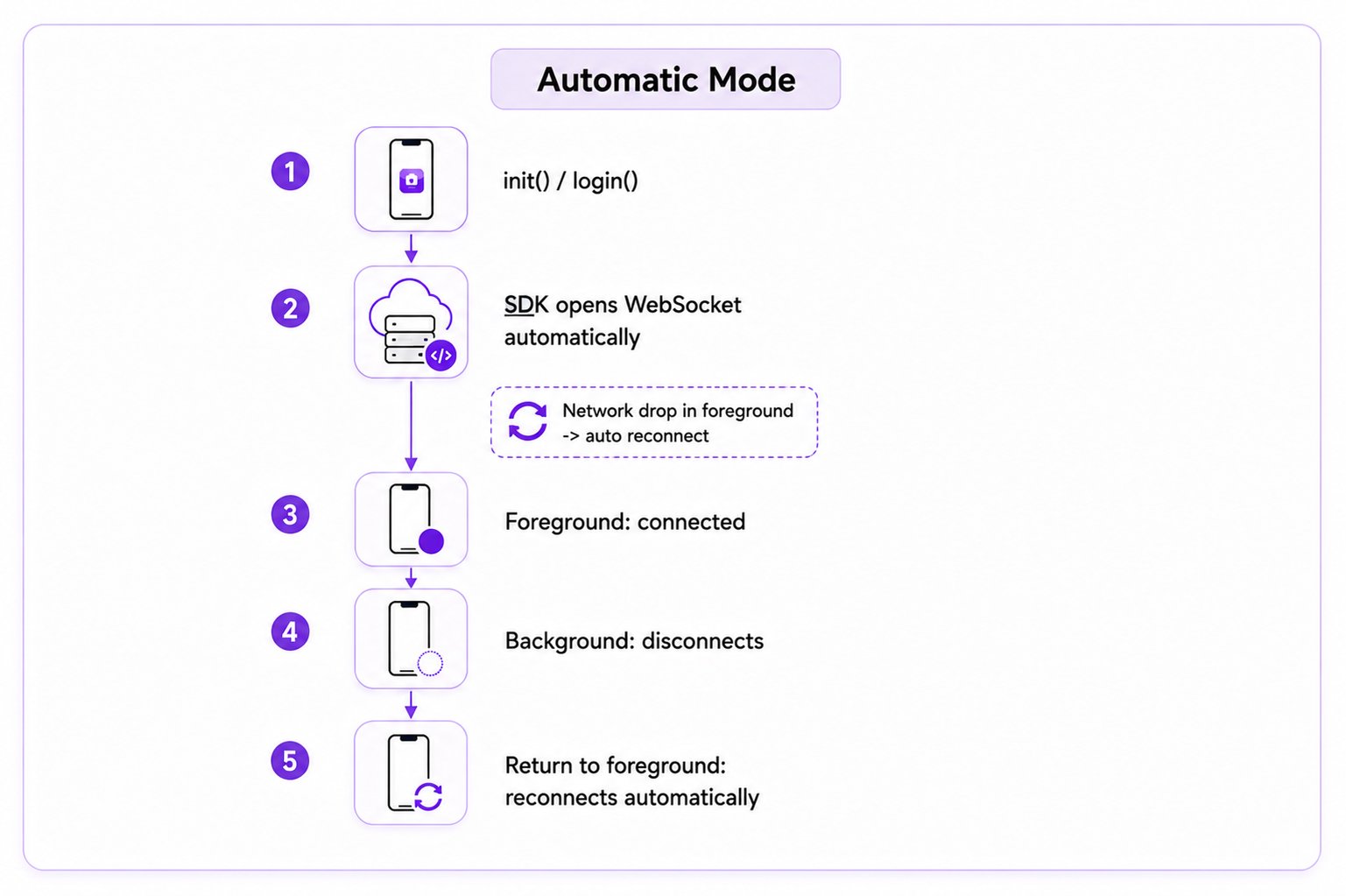 | App State | Behaviour |
| ----------------- | --------------------------------------- |
| App in foreground | Connected with WebSocket |
| App in background | Immediately disconnected with WebSocket |
## Reconnection
If the app is in the foreground and there is no internet connection, the SDK will handle the reconnection of the WebSocket in auto mode.
## Manual Mode
Set `autoEstablishSocketConnection(false)` to take control of the WebSocket connection. Call `CometChat.connect()` to establish and `CometChat.disconnect()` to break it.
By default in manual mode, the SDK disconnects after 30 seconds in the background if no pings are received. Call `CometChat.ping()` within 30 seconds to keep the connection alive.
| App State | Behaviour |
| ----------------- | --------------------------------------- |
| App in foreground | Connected with WebSocket |
| App in background | Immediately disconnected with WebSocket |
## Reconnection
If the app is in the foreground and there is no internet connection, the SDK will handle the reconnection of the WebSocket in auto mode.
## Manual Mode
Set `autoEstablishSocketConnection(false)` to take control of the WebSocket connection. Call `CometChat.connect()` to establish and `CometChat.disconnect()` to break it.
By default in manual mode, the SDK disconnects after 30 seconds in the background if no pings are received. Call `CometChat.ping()` within 30 seconds to keep the connection alive.
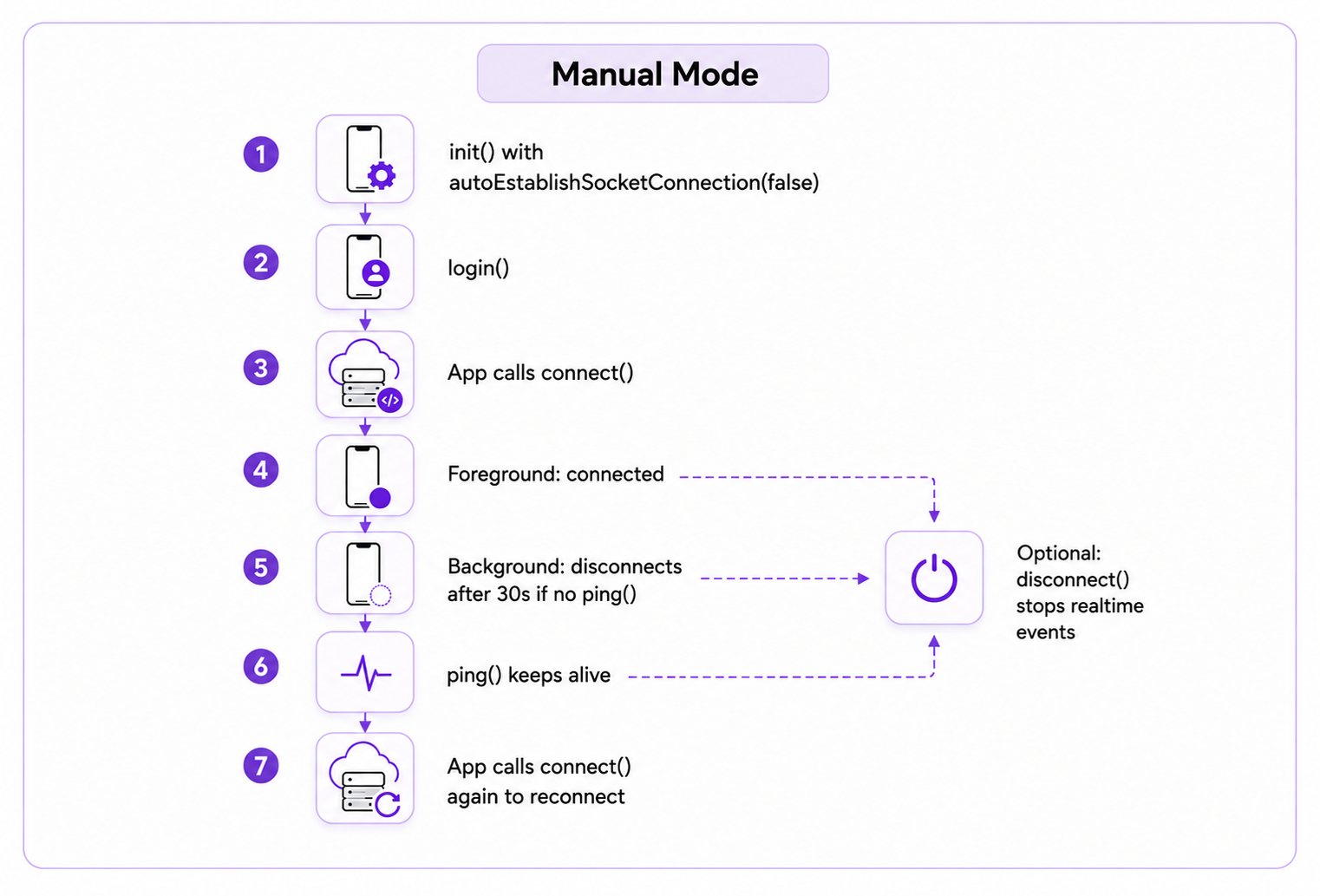 | App State | Behaviour |
| ----------------- | ----------------------------------------------------------------------------------------------------------------- |
| App in foreground | Call `CometChat.connect()` to create the WebSocket connection |
| App in background | Disconnect the WebSocket connection if no ping is received within 30 seconds after the app goes in the background |
## Enable Manual Mode
Set `autoEstablishSocketConnection(false)` during `init()` to take control of the WebSocket connection. Error callbacks receive a [`CometChatException`](/sdk/reference/auxiliary#cometchatexception):
```java theme={null}
String appId = "YOUR_APP_ID";
String region = "us";
AppSettings appSettings = new AppSettings.AppSettingsBuilder()
.setRegion(region)
.autoEstablishSocketConnection(false) //set it as false for manual mode
.build();
CometChat.init(this, appId, appSettings, new CometChat.CallbackListener() {
@Override
public void onSuccess(String s) {
Log.d(TAG, "Init successful!");
}
@Override
public void onError(CometChatException e) {
Log.d(TAG, "Error occurred : " + e.getMessage());
}
});
```
```kotlin theme={null}
val appId = "YOUR_APP_ID"
val region = "us"
val appSettings = AppSettings.AppSettingsBuilder()
.setRegion(region)
.autoEstablishSocketConnection(false) // set to false for manual mode
.build()
CometChat.init(this, appId, appSettings, object : CometChat.CallbackListener() {
override fun onSuccess(s: String) {
Log.d(TAG, "Init successful!")
}
override fun onError(e: CometChatException) {
Log.d(TAG, "Error occurred : " + e.message)
}
})
```
You can manage the connection to the WebSocket server using the `connect()`, `disconnect()`, and `ping()` methods provided by the SDK.
## Connect to the WebSocket Server
Call `connect()` to establish the connection. Ensure the user is logged in first (`CometChat.getLoggedInUser()`).
```java theme={null}
CometChat.connect(new CometChat.CallbackListener() {
@Override
public void onSuccess(String s) {
}
@Override
public void onError(CometChatException e) {
}
});
```
```kotlin theme={null}
CometChat.connect(object : CallbackListener() {
fun onSuccess(s: String) {
}
fun onError(e: CometChatException) {
}
})
```
## Disconnect from the WebSocket Server
Call `disconnect()` to break the connection. Real-time events stop until reconnected.
```java theme={null}
CometChat.disconnect(new CometChat.CallbackListener() {
@Override
public void onSuccess(String s) {
}
@Override
public void onError(CometChatException e) {
}
});
```
```kotlin theme={null}
CometChat.disconnect(object : CallbackListener() {
fun onSuccess(s: String) {
}
fun onError(e: CometChatException) {
}
})
```
## Maintain Long-Standing Background Connection
Call `CometChat.ping()` within 30 seconds of the app entering the background to keep the connection alive.
```java theme={null}
CometChat.ping(new CometChat.CallbackListener() {
@Override
public void onSuccess(String s) {
}
@Override
public void onError(CometChatException e) {
}
});
```
```kotlin theme={null}
CometChat.ping(object : CallbackListener() {
override fun onSuccess(s: String) {
}
override fun onError(e: CometChatException) {
}
})
```
In manual mode with the app in the foreground, the SDK auto-reconnects if the internet drops. If the app is in the background and the connection was disconnected, call `CometChat.connect()` to reconnect.
***
## Next Steps
Configure SDK initialization settings
Monitor SDK connection status changes
Handle user authentication events
Receive real-time messages and events
| App State | Behaviour |
| ----------------- | ----------------------------------------------------------------------------------------------------------------- |
| App in foreground | Call `CometChat.connect()` to create the WebSocket connection |
| App in background | Disconnect the WebSocket connection if no ping is received within 30 seconds after the app goes in the background |
## Enable Manual Mode
Set `autoEstablishSocketConnection(false)` during `init()` to take control of the WebSocket connection. Error callbacks receive a [`CometChatException`](/sdk/reference/auxiliary#cometchatexception):
```java theme={null}
String appId = "YOUR_APP_ID";
String region = "us";
AppSettings appSettings = new AppSettings.AppSettingsBuilder()
.setRegion(region)
.autoEstablishSocketConnection(false) //set it as false for manual mode
.build();
CometChat.init(this, appId, appSettings, new CometChat.CallbackListener() {
@Override
public void onSuccess(String s) {
Log.d(TAG, "Init successful!");
}
@Override
public void onError(CometChatException e) {
Log.d(TAG, "Error occurred : " + e.getMessage());
}
});
```
```kotlin theme={null}
val appId = "YOUR_APP_ID"
val region = "us"
val appSettings = AppSettings.AppSettingsBuilder()
.setRegion(region)
.autoEstablishSocketConnection(false) // set to false for manual mode
.build()
CometChat.init(this, appId, appSettings, object : CometChat.CallbackListener() {
override fun onSuccess(s: String) {
Log.d(TAG, "Init successful!")
}
override fun onError(e: CometChatException) {
Log.d(TAG, "Error occurred : " + e.message)
}
})
```
You can manage the connection to the WebSocket server using the `connect()`, `disconnect()`, and `ping()` methods provided by the SDK.
## Connect to the WebSocket Server
Call `connect()` to establish the connection. Ensure the user is logged in first (`CometChat.getLoggedInUser()`).
```java theme={null}
CometChat.connect(new CometChat.CallbackListener() {
@Override
public void onSuccess(String s) {
}
@Override
public void onError(CometChatException e) {
}
});
```
```kotlin theme={null}
CometChat.connect(object : CallbackListener() {
fun onSuccess(s: String) {
}
fun onError(e: CometChatException) {
}
})
```
## Disconnect from the WebSocket Server
Call `disconnect()` to break the connection. Real-time events stop until reconnected.
```java theme={null}
CometChat.disconnect(new CometChat.CallbackListener() {
@Override
public void onSuccess(String s) {
}
@Override
public void onError(CometChatException e) {
}
});
```
```kotlin theme={null}
CometChat.disconnect(object : CallbackListener() {
fun onSuccess(s: String) {
}
fun onError(e: CometChatException) {
}
})
```
## Maintain Long-Standing Background Connection
Call `CometChat.ping()` within 30 seconds of the app entering the background to keep the connection alive.
```java theme={null}
CometChat.ping(new CometChat.CallbackListener() {
@Override
public void onSuccess(String s) {
}
@Override
public void onError(CometChatException e) {
}
});
```
```kotlin theme={null}
CometChat.ping(object : CallbackListener() {
override fun onSuccess(s: String) {
}
override fun onError(e: CometChatException) {
}
})
```
In manual mode with the app in the foreground, the SDK auto-reconnects if the internet drops. If the app is in the background and the connection was disconnected, call `CometChat.connect()` to reconnect.
***
## Next Steps
Configure SDK initialization settings
Monitor SDK connection status changes
Handle user authentication events
Receive real-time messages and events